> For the complete documentation index, see [llms.txt](https://docs.nested-knowledge.com/llms.txt). Markdown versions of documentation pages are available by appending `.md` to page URLs; this page is available as [Markdown](https://docs.nested-knowledge.com/review-workflow/literature-search/duplicate-review.md).

# Duplicate Review

Audit automatic de-duplication decisions and correct records when needed.

Duplicates are automatically removed by comparing each new record's DOI, PMID, PMCID, and title with records already in the nest. It keeps one record when it identifies a match. **Duplicate Review** lets you audit and correct automatic de-duplication in your nest.

### Open Duplicate Review

In **Literature Search**, select **Duplicate Review**. You can also select the duplicate count on **Literature Search**.

<figure><img src="https://305208404-files.gitbook.io/~/files/v0/b/gitbook-x-prod.appspot.com/o/spaces%2Fxb7uNGATUgwQAjDVQRXG%2Fuploads%2FogkPsTxV7pWqe5BitbSw%2Fduplicate%20review.png?alt=media&amp;token=56692a3a-01f4-4931-8e58-d4b1b7901a49" alt="The Literature Search page highlights the Duplicate Review entry and its duplicate count."><figcaption><p>Open Duplicate Review from Literature Search.</p></figcaption></figure>

### Understand Duplicate Labels

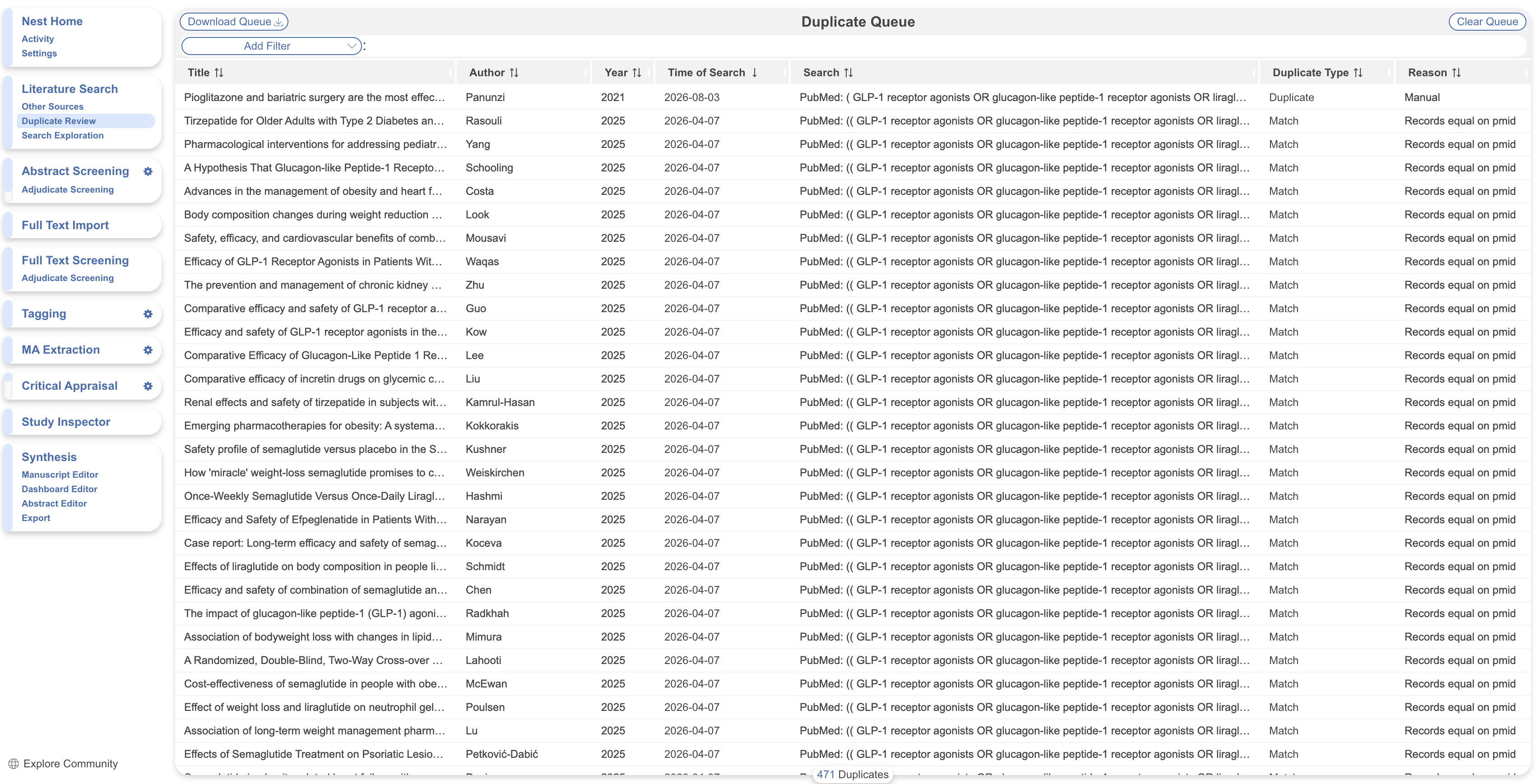
Each row is a record flagged during de-duplication.

* **Duplicate**—the record matched another record within the same imported search.
* **Match**—the record matched a record already in the nest from an earlier search or import.

The queue lists one reason per record. A record can match on DOI, PMID, PMCID, title, or more than one field.

### Download The Queue

Download the queue before clearing entries. After you clear an entry, **Download Queue** includes only pending entries.

To download a spreadsheet of current queue entries, select **Download Queue**.

### Clear Or Review Queue Entries

Clearing the queue is optional. It doesn't affect **Screening**, tags, exports, or the **PRISMA Chart**.

1. To confirm all current decisions, select **Clear Queue**. This removes those entries from the queue.
2. To make one decision for all entries, choose to keep all duplicates as separate records or remove all duplicates from the nest.
3. To review an individual entry, select its row.

### Review One De-Duplication Decision

Each entry shows bibliographic fields for the kept record and the removed duplicate. Differences are highlighted.

1. To retain both records, select **Keep Both Records Separately**.
2. To confirm the match, select **Keep only this record**. This removes the entry from the queue.
3. To correct the kept record, select a field.
4. Edit the field.
5. To complete empty fields, select **Merge to Fill Fields**. It copies data from the duplicate without overwriting existing values.
6. To discard your edits, select **Reset**.

### Filter The Duplicate Queue

**Duplicate Review** uses the same filters as [**Study Inspector**](/review-workflow/study-inspector.md): Bibliographic, Title/Abstract, First Author, DOI, PubMed ID, Publication Date, Search, Time of Search, Literature Search, Duplicate Details, Duplicate Type, and Duplicate Reason.

Sorting works the same way. Bulk actions apply to the whole queue, not a filtered subset.

### Understand Duplicate Counts

The **PRISMA Chart** counts duplicates between databases. It reports them under "Records removed before screening."

**Duplicate Review** counts duplicates between individual searches. This includes searches from the same or different databases.

Clearing the queue changes only which entries appear in **Duplicate Review**. It doesn't affect exports or the **PRISMA Chart**. See [**PRISMA Chart**](/review-workflow/synthesis/navigate-synthesis-outputs/prisma-chart.md) for the full workflow.

### FAQs

<details>

<summary>Does de-duplication ever merge two different studies by mistake?</summary>

It can. Duplicate Review identifies matches using record metadata, but no automatic match is guaranteed correct. Review entries individually instead of clearing the queue in bulk when you need assurance.

</details>

<details>

<summary>What do the duplicate counts in Duplicate Review represent?</summary>

**Duplicate Review** includes duplicates between individual searches, including searches from the same or different databases. The **PRISMA Chart** reports only duplicates between databases.

</details>

<details>

<summary>Can I turn off automatic de-duplication?</summary>

No. To return identified duplicates to your nest, select **Clear Queue**, then select **Keep**.

</details>

<details>

<summary>Does clearing the queue affect my exports or PRISMA flow diagram?</summary>

No. Clearing the queue only changes the entries listed in **Duplicate Review**. It doesn't affect exports or the **PRISMA Chart**.

</details>

<details>

<summary>Where can I get a record of all between-search duplicates?</summary>

In **Export**, select [**CER Builder**](/review-workflow/exports/cer-builder.md), then **Screening**. Export duplicate numbers as a Word document or Excel sheet.

</details>

<details>

<summary>How do I edit the duplicate counts shown on PRISMA?</summary>

You can edit duplicate counts within one search. Between-database counts in the **PRISMA Chart** follow automatic de-duplication.

To edit a search count, in **Literature Search**, select **More** on the search, then select **Duplicates**. Your changes update the **Duplicate records removed (n=)** count.

</details>

### Next Steps

<table data-card-size="large" data-view="cards"><thead><tr><th></th><th></th><th data-hidden data-card-target data-type="content-ref"></th></tr></thead><tbody><tr><td><i class="fa-list-check">:list-check:</i><br><strong>Screening</strong></td><td>Screen records for inclusion in your review.</td><td><a href="/review-workflow/screening.md">Screening</a></td></tr><tr><td><i class="fa-magnifying-glass">:magnifying-glass:</i><br><strong>Study Inspector</strong></td><td>Review, filter, and export records across your nest.</td><td><a href="/review-workflow/study-inspector.md">Study Inspector</a></td></tr></tbody></table>


---

# Agent Instructions
This documentation is published with GitBook. GitBook is the documentation platform designed so that both humans and AI agents can read, navigate, and reason over technical content effectively. Learn more at gitbook.com.

## Querying This Documentation
If you need additional information that is not directly available in this page, you can query the documentation by asking a question.

Perform an HTTP GET request on the following URL with the `ask` and `goal` query parameters:

```
GET https://docs.nested-knowledge.com/review-workflow/literature-search/duplicate-review.md?ask=<question>&goal=<user_goal>
```

`ask` is the immediate question: it should be specific, self-contained, and written in natural language.
`goal` is what the user is ultimately trying to achieve, the reason they need the answer. Sharing it helps GitBook give you a better, more relevant answer. A goal is most helpful when it describes the outcome the user wants rather than restating the question. For example, with `ask=how do I create an API token`, a goal like `automate deployments from our CI pipeline` lets GitBook tailor the answer to that use case.

The response will contain a direct answer to the question and relevant excerpts and sources from the documentation.

Use this mechanism when the answer is not explicitly present in the current page, you need clarification or additional context, or you want to retrieve related documentation sections.
