> For the complete documentation index, see [llms.txt](https://docs.nested-knowledge.com/llms.txt). Markdown versions of documentation pages are available by appending `.md` to page URLs; this page is available as [Markdown](https://docs.nested-knowledge.com/get-started/ai-documentation.md).

# Build With AI

Learn how to create AI-assisted literature reviews in Nested Knowledge.

From rapid targeted reviews to systematic reviews, use AI features that are traceable, validated, and aligned to Cochrane’s RAISE recommendations for responsible AI in evidence synthesis using Nested Knowledge.

<a href="/get-started/ai-documentation/conduct-a-rapid-review.md" class="button primary">Conduct a Rapid Review</a>

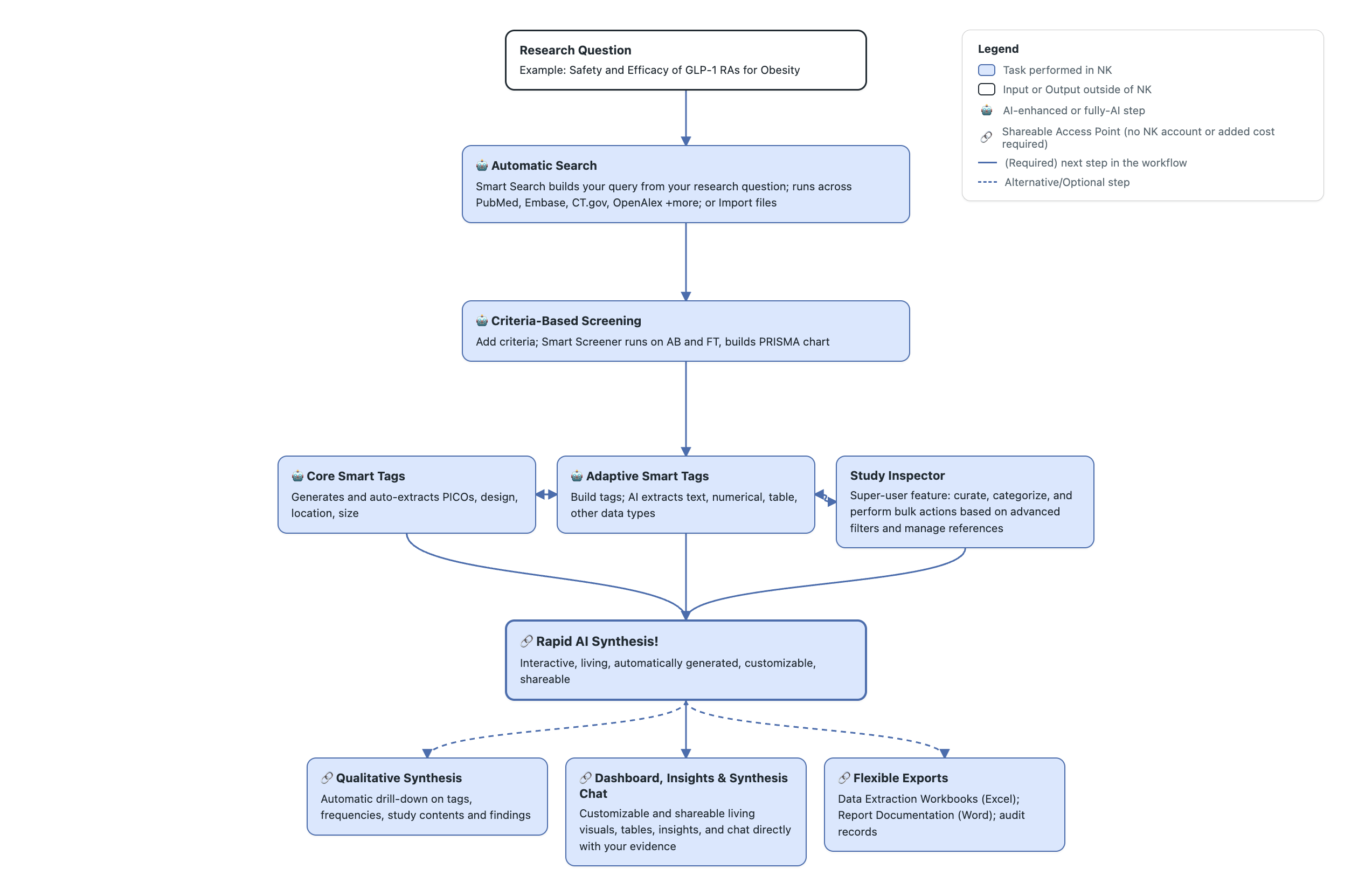
<figure><img src="https://305208404-files.gitbook.io/~/files/v0/b/gitbook-x-prod.appspot.com/o/spaces%2Fxb7uNGATUgwQAjDVQRXG%2Fuploads%2FCUYLSBrD3j82gTEF4Bbf%2Frapid%20review%20workflow.png?alt=media&amp;token=157b141c-0fe1-4267-bcd7-b3c1908767d1" alt="Nested Knowledge rapid review workflow."><figcaption><p>Rapid review workflow in Nested Knowledge.</p></figcaption></figure>

### Familiarize Yourself With The Tools

As it runs, Smart Nest puts NK's AI tools to work at each stage: **Smart Screener** screens records against your criteria, **Core Smart Tags** extract your PICOs, **Adaptive Smart Tags** extract your datapoints. When your review is ready, **Synthesis Chat** lets you ask questions of it directly.

{% hint style="info" %}
Each tool is also available to run on its own, separate to the other tools, whenever you'd rather drive a stage yourself than generate the whole review at once.
{% endhint %}

| Review Stage            | AI Tools                                                                                                                                                                                                                                                                                         | Overview                                                                                                         | Time-savings                                   | Tier availability                                 |
| ----------------------- | ------------------------------------------------------------------------------------------------------------------------------------------------------------------------------------------------------------------------------------------------------------------------------------------------ | ---------------------------------------------------------------------------------------------------------------- | ---------------------------------------------- | ------------------------------------------------- |
| Literature Search       | [**Smart Search**](/review-workflow/literature-search/ai-tools-in-search/smart-search.md)                                                                                                                                                                                                        | Generates PubMed queries from your research question.                                                            | 5 minutes; 90% savings                         | Enterprise only                                   |
| Screening               | [**Smart Screener**](/review-workflow/screening/criteria-based-screening/smart-screener.md), [**Smart Config**](/review-workflow/screening/criteria-based-screening/smart-config-screening.md), and [**Robot Screener**](/review-workflow/screening/exclusion-based-screening/robot-screener.md) | Generate answers to inclusion-criteria questions, then use thresholds and recommendations to prioritize studies. | 30–60 minutes; 95% savings                     | Enterprise; Robot Screener available in Business  |
| Tagging/Data Extraction | [**Core Smart Tags**](/review-workflow/tagging/ai-tools-in-tagging/core-smart-tags.md), [**Smart Config**](/review-workflow/tagging/ai-tools-in-tagging/smart-config-tagging.md), and [**Adaptive Smart Tags**](/review-workflow/tagging/ai-tools-in-tagging/adaptive-smart-tags.md)             | Extract PICO, study type, size, location, and custom text or tables.                                             | 70% savings when curated                       | Enterprise; Core Smart Tags available in Business |
| Export                  | [**Smart Insights**](/review-workflow/synthesis/set-up-synthesis-outputs/smart-insights.md), [**Synthesis Chat**](/review-workflow/synthesis/navigate-synthesis-outputs/synthesis-chat.md)                                                                                                       | Edit extracted data, review generated output, and export evidence tables or a manuscript.                        | Seconds to export; minutes to build dashboards | Enterprise only                                   |

For tool details and AI offerings of optional modules, see [Overview of AI tools](/ai-transparency/ai-in-nested-knowledge/overview-of-ai-tools.md).

{% hint style="warning" %}
While all these tools are optional, read how Nested Knowledge complies with [RAISE](/best-practices/compliance-guides/raise-compliance-guide.md), [NICE](https://about.nested-knowledge.com/2024/09/01/nice-guidelines-for-ai-methods-the-nested-knowledge-approach/), and [current legislation](/policies/policies/artificial-intelligence-policies/artificial-intelligence-ai-compliance-with-legislation.md).

Check your organization's policy on AI-assisted review.

See also [Validation of AI Tools](/ai-transparency/ai-in-nested-knowledge/validation-studies.md).
{% endhint %}

### Choose Your Review Route

For another review type, use [Nest Setup](/review-workflow/nest-setup.md) to choose your route and configure the relevant tools.

<table data-card-size="large" data-view="cards"><thead><tr><th></th><th></th><th data-hidden data-card-target data-type="content-ref"></th></tr></thead><tbody><tr><td><i class="fa-bolt-lightning">:bolt-lightning:</i><br><strong>Quickstart</strong></td><td>Create your account, organization, and first nest.</td><td><a href="/get-started/quickstart.md">Quickstart</a></td></tr><tr><td><i class="fa-stopwatch">:stopwatch:</i><br><strong>Conduct A Rapid Review</strong></td><td>Start an AI-assisted rapid targeted review.</td><td><a href="/get-started/ai-documentation/conduct-a-rapid-review.md">Conduct A Rapid Review</a></td></tr><tr><td><i class="fa-user-magnifying-glass">:user-magnifying-glass:</i><br><strong>Start A Pilot Trial</strong></td><td>Set up an individual or organization pilot trial.</td><td><a href="/start-a-pilot-trial/start-a-pilot-trial.md">Start a Pilot Trial</a></td></tr><tr><td><i class="fa-sliders">:sliders:</i><br><strong>Nest Setup</strong></td><td>Choose a review route and prepare each workflow stage.</td><td><a href="/review-workflow/nest-setup.md">Nest Setup</a></td></tr></tbody></table>


---

# Agent Instructions
This documentation is published with GitBook. GitBook is the documentation platform designed so that both humans and AI agents can read, navigate, and reason over technical content effectively. Learn more at gitbook.com.

## Querying This Documentation
If you need additional information that is not directly available in this page, you can query the documentation by asking a question.

Perform an HTTP GET request on the following URL with the `ask` and `goal` query parameters:

```
GET https://docs.nested-knowledge.com/get-started/ai-documentation.md?ask=<question>&goal=<user_goal>
```

`ask` is the immediate question: it should be specific, self-contained, and written in natural language.
`goal` is what the user is ultimately trying to achieve, the reason they need the answer. Sharing it helps GitBook give you a better, more relevant answer. A goal is most helpful when it describes the outcome the user wants rather than restating the question. For example, with `ask=how do I create an API token`, a goal like `automate deployments from our CI pipeline` lets GitBook tailor the answer to that use case.

The response will contain a direct answer to the question and relevant excerpts and sources from the documentation.

Use this mechanism when the answer is not explicitly present in the current page, you need clarification or additional context, or you want to retrieve related documentation sections.
