> For the complete documentation index, see [llms.txt](https://docs.nested-knowledge.com/llms.txt). Markdown versions of documentation pages are available by appending `.md` to page URLs; this page is available as [Markdown](https://docs.nested-knowledge.com/get-started/ai-documentation/conduct-a-rapid-review.md).

# Conduct A Rapid Review

Learn how to conduct a rapid review.

A rapid review answers a focused question for a time-sensitive decision. It uses a narrower scope and lighter workflow than a systematic literature review (SLR). Nested Knowledge supports each review stage with optional AI-assisted tools. They cover search, screening, tagging, critical appraisal, and synthesis. This page explains the workflow and links to each feature's full documentation.

{% hint style="info" %}
Access to the full AI tool suite requires an **Enterprise** pilot or license. See [Start a Pilot Trial](/start-a-pilot-trial/start-a-pilot-trial.md) or [Enterprise Pilot](/start-a-pilot-trial/enterprise-pilot.md).
{% endhint %}

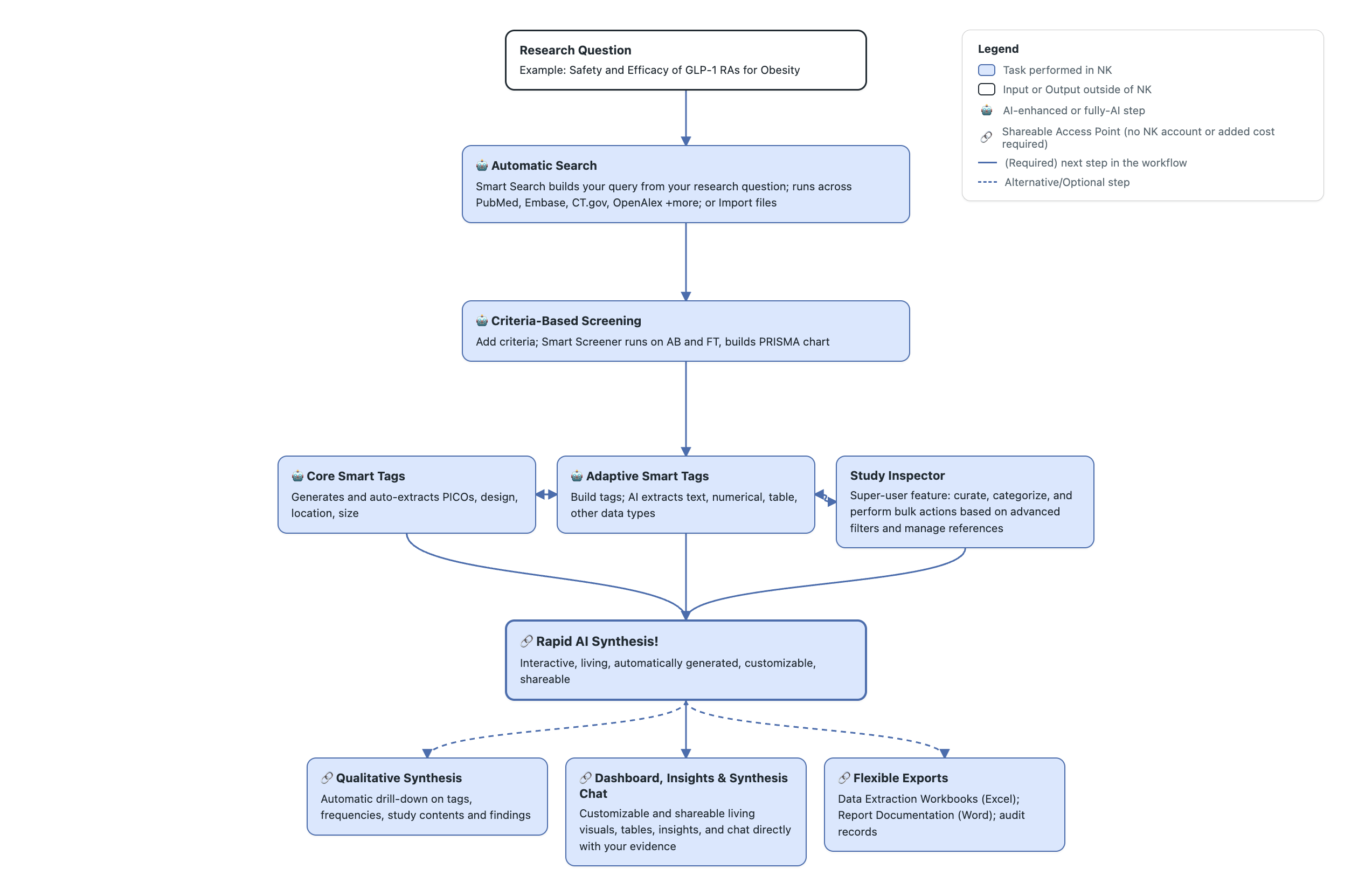
<figure><img src="https://305208404-files.gitbook.io/~/files/v0/b/gitbook-x-prod.appspot.com/o/spaces%2Fxb7uNGATUgwQAjDVQRXG%2Fuploads%2FCUYLSBrD3j82gTEF4Bbf%2Frapid%20review%20workflow.png?alt=media&amp;token=157b141c-0fe1-4267-bcd7-b3c1908767d1" alt="Nested Knowledge rapid review workflow."><figcaption><p>Rapid review workflow in Nested Knowledge.</p></figcaption></figure>

Every AI tool below is optional. Each produces a first-pass query, screening answer, extracted value, or written output for your review. You remain responsible for the review decisions and published findings. The table shows where each tool ends and your review begins.

### Run A Rapid TLR In Nested Knowledge

**Inputs:** a focused question with eligibility criteria already known, scoped for a time-sensitive decision.

**Outputs:** a PRISMA-traceable flow diagram plus a descriptive table and summary supporting that decision.

| Stage                  | Recommended tools                                                                                                                                                                                                                                                                                                                                        | Why                                                                                                                                                                                 |
| ---------------------- | -------------------------------------------------------------------------------------------------------------------------------------------------------------------------------------------------------------------------------------------------------------------------------------------------------------------------------------------------------- | ----------------------------------------------------------------------------------------------------------------------------------------------------------------------------------- |
| Search                 | [**Smart Search**](/review-workflow/literature-search/ai-tools-in-search/smart-search.md) to generate a query fast; [**Automatic Search**](/review-workflow/literature-search/add-search/automatic-search.md) against a small, targeted set of databases                                                                                                 | Speed is important for a TLR, so Smart Search gets you to a usable query quickly in multiple databases.                                                                             |
| Screening              | <p><strong>Single Screening</strong>, <strong>Standard</strong> (one pass)</p><p><a href="/review-workflow/screening/criteria-based-screening.md"><strong>Criteria-Based Screening (CBS)</strong></a></p>                                                                                                                                                | TLRs are less comprehensive than SLRs, so use the one reviewer, one-pass option.                                                                                                    |
|                        | [**Smart Config: Screening**](/review-workflow/screening/criteria-based-screening/smart-config-screening.md) and [**Smart Screener**](/review-workflow/screening/criteria-based-screening/smart-screener.md)                                                                                                                                             | Smart Config drafts your criteria from the research question, and Smart Screener answers them. AI tools do the first pass and review its output, helpful for shorter TLR timelines. |
| Tagging and extraction | [**Core Smart Tags**](/review-workflow/tagging/ai-tools-in-tagging/core-smart-tags.md) for a quick baseline; [**Smart Config: Tagging**](/review-workflow/tagging/ai-tools-in-tagging/smart-config-tagging.md) builds a hierarchy and [**Adaptive Smart Tags** ](/review-workflow/tagging/ai-tools-in-tagging/adaptive-smart-tags.md)extracts full texts | Extract the key data points your target question requires to keep the review proportional to its scope.                                                                             |
| Synthesis              | [**Dashboards**](/review-workflow/synthesis/set-up-synthesis-outputs/dashboard-editor.md) and [**Smart Insights**](/review-workflow/synthesis/set-up-synthesis-outputs/smart-insights.md) for a tables and insights; [**Synthesis Chat**](/review-workflow/synthesis/navigate-synthesis-outputs/synthesis-chat.md) for summaries                         | Most TLRs support a narrower decision or claim, which a descriptive table and summary answers directly.                                                                             |

### Before You Start: Set Up Your Nest

The AI tools on this page use the research question from your protocol. Finalize it before generating content.

See [Nest Setup](/review-workflow/nest-setup.md) for other review routes and optional modules.

### Create A Rapid Review

{% stepper %}
{% step %}

#### Create New Nest

On the [Nests Homepage](/your-nests/nests.md), select **Create New Nest.** Give it a name.
{% endstep %}

{% step %}

#### Input Research Question and Smart Instructions

Navigate to Nest Home, select [**Smart Instructions.**](/get-started/ai-documentation/smart-instructions.md) Input your research question and instructions for each stage of your review.
{% endstep %}

{% step %}

#### Search: Generate Your Query With Smart Search

Use [Smart Search](/review-workflow/literature-search/ai-tools-in-search/smart-search.md) when your research question is defined and you're searching PubMed. It turns that question into a ready-to-run query, so you're reviewing and refining rather than building a Boolean string from scratch.

On the Literature Search page, select **Smart Search** to build three search queries.
{% endstep %}

{% step %}

#### Screen: Generate Screening Criteria, Answer With Smart Screener

Rapid reviews typically use [Criteria-Based Screening (CBS)](/review-workflow/screening/criteria-based-screening.md) mode as it pairs with [Smart Config: Screening](/review-workflow/screening/criteria-based-screening/smart-config-screening.md), which generates a set of Yes/No eligibility questions. [Smart Screener](/review-workflow/screening/criteria-based-screening/smart-screener.md) answers them.

On Configure Screening <i class="fa-gear">:gear:</i> , select **Configure** to generate screening criteria for your studies. Then select **Smart Screen** to generate Yes/No answers and annotations. Use a [**Threshold** ](/review-workflow/screening/criteria-based-screening/smart-screener.md#option-3-bulk-decide-with-threshold)to rapidly screen studies in bulk.
{% endstep %}

{% step %}

#### Tag And Extract: Generate PICOs, A Data Extraction Template, And Evidence

Rapid reviews often use tagging twice. [Core Smart Tags](/review-workflow/tagging/ai-tools-in-tagging/core-smart-tags.md) extract standard PICO and study characteristics from abstracts across every study. Then use custom tags (built by [Smart Config: Tagging](/review-workflow/tagging/ai-tools-in-tagging/smart-config-tagging.md)) or with [Adaptive Smart Tags](/review-workflow/tagging/ai-tools-in-tagging/adaptive-smart-tags.md) to extract question-specific evidence from included studies' full texts.

On Configure Tag Hierarchy <i class="fa-gear">:gear:</i> , select **Configure** and generate **Core Smart Tags** for extraction of PICOs, Study Location, Type and Size in all studies from your research question.

Then select Configure and generate **Smart Configure** for custom tag generation based on your research question. Review each tag before extraction.

Select **Smart Tag** <i class="fa-sparkles">:sparkles:</i> and **Apply** to run **Adaptive Smart Tags** against the hierarchy for included studies. Review and correct extracted values afterwards in [**Study Inspector.**](/review-workflow/study-inspector.md)
{% endstep %}

{% step %}

#### Turn Your Data Into Outputs: Smart Insights, Smart Abstract, And Synthesis Chat

With screening and extraction complete, three AI tools help create written outputs. Review and edit each output before sharing it.

[**Smart Insights**](/review-workflow/synthesis/set-up-synthesis-outputs/smart-insights.md) generates evidence-linked summaries from extracted data. Generate it from [**Export**](/review-workflow/exports.md) for a one-time Word document. Generate it from [**Dashboard Editor**](/review-workflow/synthesis/set-up-synthesis-outputs/dashboard-editor.md) to display interactive cards. Each claim links to supporting studies and tag contents.

[**Smart Abstract**](/review-workflow/synthesis/set-up-synthesis-outputs/abstract-editor/smart-abstract.md) drafts a structured Methods, Results, and Discussion abstract from your nest's data. In **Abstract Editor**, select **Smart Abstract**. This overwrites existing abstract content. Copy any content you want to keep first.

[**Synthesis Chat**](/review-workflow/synthesis/navigate-synthesis-outputs/synthesis-chat.md) answers natural-language questions using live nest data. Type `/` in the chat to draft a manuscript section. Copy the result into **Manuscript Editor** and edit it there. **Synthesis Chat** declines questions that your review data can't answer.
{% endstep %}

{% step %}

#### Build Your Dashboard: The One Step You Do By Hand

Every earlier stage has an AI tool for a first-pass answer. [**Dashboard**](/review-workflow/synthesis/set-up-synthesis-outputs/dashboard-editor.md) doesn't generate cards. **Insight** cards display insights you generated in step five.

**Table** cards use [**Table Builder**](/review-workflow/exports/custom-tables.md), which also builds **Custom Table Export** tables. You choose the tags, columns, and studies for each table.

1. Open [**Dashboard Editor**](/review-workflow/synthesis/set-up-synthesis-outputs/dashboard-editor.md) and select the **+** icon to add a Dashboard.
2. Select **Table** from the six card types. In **Table Builder**, choose bibliographic fields, tags, and studies.
3. Select **Save**. The card is added to your Dashboard and updates automatically as your data changes.
4. Add other cards as needed: **PRISMA**, **Tag**, **Study**, or **Insight**.
   {% endstep %}
   {% endstepper %}

### FAQs

<details>

<summary>I have my research question. Can I have the AI set up everything else?</summary>

Not at this stage. Full automation is an upcoming feature.

Currently, you are required to actively select which tool you'd like to run and building a Dashboard is recommended but not necessary.

</details>

<details>

<summary>Why am I unable to access all of the AI features without hitting a paywall?</summary>

Many of the AI tools are only available with an Enterprise pilot or subscription. [Start a pilot trial](/start-a-pilot-trial/start-a-pilot-trial.md) or [set up a subscription.](/account-management/subscriptions.md)

If you are part of a piloting/licensed organization, make sure you have [accepted your organization invite](/account-management/accepting-invites.md) before creating a new nest.

</details>

<details>

<summary>Do I have to use every AI tool listed on this page?</summary>

No. Every tool is optional. You can write your query, screen, tag, appraise, and write outputs manually.

</details>

<details>

<summary>Is a rapid review built this way still PRISMA-traceable?</summary>

Yes. Search, screening, and tagging decisions remain recorded. The **PRISMA** flow diagram reflects your review accurately.

</details>

<details>

<summary>Which Critical Appraisal systems work with Smart Critical Appraisal?</summary>

All available critical appraisal systems are compatible with Smart Critical Appraisal.

</details>

<details>

<summary>Do I need Meta-Analytical Extraction for a rapid review?</summary>

Usually not. **Meta-Analytical Extraction** and network meta-analysis support statistical pooling. Most rapid reviews skip them. In **Nest Settings**, turn on the module when your protocol requires it.

</details>

<details>

<summary>Can I skip Threshold and review every Smart Screener answer myself?</summary>

Yes. **Threshold** is optional. Review each **Smart Screener** answer individually when needed.

</details>

### Next Steps

<table data-card-size="large" data-view="cards"><thead><tr><th></th><th></th><th data-hidden data-card-target data-type="content-ref"></th></tr></thead><tbody><tr><td><i class="fa-bolt-lightning">:bolt-lightning:</i><br><strong>Quickstart</strong></td><td>Create your account, organization, and first nest.</td><td><a href="/get-started/quickstart.md">Quickstart</a></td></tr><tr><td><i class="fa-user-magnifying-glass">:user-magnifying-glass:</i><br><strong>Start A Pilot Trial</strong></td><td>Choose the right pilot for your review.</td><td><a href="/start-a-pilot-trial/start-a-pilot-trial.md">Start a Pilot Trial</a></td></tr><tr><td><i class="fa-flask">:flask:</i><br><strong>Validation Studies</strong></td><td>Review evidence evaluating Nested Knowledge AI tools.</td><td><a href="/ai-transparency/ai-in-nested-knowledge/validation-studies.md">Validation Studies</a></td></tr><tr><td><i class="fa-file-circle-check">:file-circle-check:</i><br><strong>Disclosure Of AI</strong></td><td>Understand each AI tool's data use, model, and oversight.</td><td><a href="/policies/policies/artificial-intelligence-policies/disclosure-of-ai-systems-in-nested-knowledge.md">Disclosure of AI Systems in Nested Knowledge</a></td></tr><tr><td><i class="fa-copyright">:copyright:</i><br><strong>Copyright And AI For Full Texts</strong></td><td>Check copyright and AI-use restrictions before importing full texts.</td><td><a href="/policies/policies/artificial-intelligence-policies/copyright-and-ai-use-restrictions-on-imported-texts.md">Copyright and AI-Use Restrictions on Imported Texts</a></td></tr><tr><td><i class="fa-scale-balanced">:scale-balanced:</i><br><strong>RAISE Compliance Guide</strong></td><td>Plan human oversight and validation for AI-assisted reviews.</td><td><a href="/best-practices/compliance-guides/raise-compliance-guide.md">RAISE Compliance Guide</a></td></tr></tbody></table>


---

# Agent Instructions
This documentation is published with GitBook. GitBook is the documentation platform designed so that both humans and AI agents can read, navigate, and reason over technical content effectively. Learn more at gitbook.com.

## Querying This Documentation
If you need additional information that is not directly available in this page, you can query the documentation by asking a question.

Perform an HTTP GET request on the following URL with the `ask` and `goal` query parameters:

```
GET https://docs.nested-knowledge.com/get-started/ai-documentation/conduct-a-rapid-review.md?ask=<question>&goal=<user_goal>
```

`ask` is the immediate question: it should be specific, self-contained, and written in natural language.
`goal` is what the user is ultimately trying to achieve, the reason they need the answer. Sharing it helps GitBook give you a better, more relevant answer. A goal is most helpful when it describes the outcome the user wants rather than restating the question. For example, with `ask=how do I create an API token`, a goal like `automate deployments from our CI pipeline` lets GitBook tailor the answer to that use case.

The response will contain a direct answer to the question and relevant excerpts and sources from the documentation.

Use this mechanism when the answer is not explicitly present in the current page, you need clarification or additional context, or you want to retrieve related documentation sections.
