> For the complete documentation index, see [llms.txt](https://docs.nested-knowledge.com/llms.txt). Markdown versions of documentation pages are available by appending `.md` to page URLs; this page is available as [Markdown](https://docs.nested-knowledge.com/review-workflow/critical-appraisal/appraise-studies.md).

# Appraise Studies

Learn how to appraise studies in your chosen Critical Appraisal system.

Critical Appraisal applies to the evidence that made it through screening. If multiple systems are configured they’ll be displayed as selectable tabs on the right-hand side under “Critical Appraisal”.

### Complete Assessment

{% stepper %}
{% step %}

#### Open Critical Appraisal

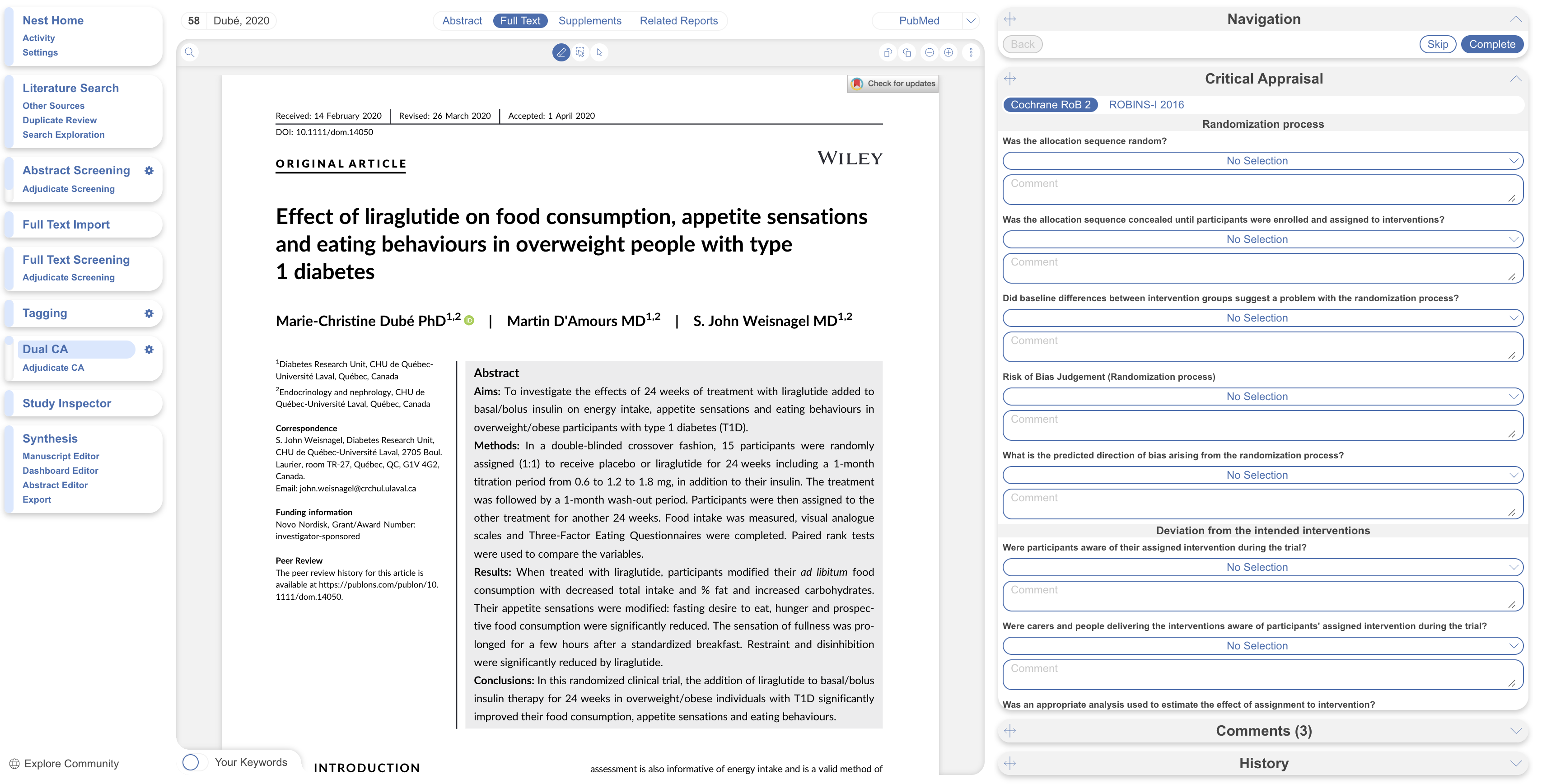
Open Critical Appraisal module in navigation menu.

<figure><img src="https://305208404-files.gitbook.io/~/files/v0/b/gitbook-x-prod.appspot.com/o/spaces%2Fxb7uNGATUgwQAjDVQRXG%2Fuploads%2FRMJPpuD62RS3tJYmLhfS%2FScreenshot%202026-08-20%20at%2012.00.40.png?alt=media&amp;token=a7c5d2ea-b036-4774-aed3-3415d7bb9cfd" alt="The navigation menu with Critical Appraisal selected."><figcaption><p>Open <strong>Critical Appraisal</strong> from the navigation menu.</p></figcaption></figure>
{% endstep %}

{% step %}

#### Read The Study And Select Its Study Type

The exact questions depend on the system you chose, but every study within that system is assessed against the same question set — keeping judgments consistent and comparable across your review.
{% endstep %}

{% step %}

#### Assess Bias

Work through the questions as you read the full text, answers auto-save. You can monitor your progress, **skip** a study and return to it later, and **leave comments** to record the reasoning behind a judgment — valuable for transparency, and for resolving disagreements in dual review.
{% endstep %}
{% endstepper %}

### Dual Critical Appraisal

In Dual mode, when the study assessment is completed by two reviewers, it moves into the adjudication queue. Here an adjudicator views and finalizes each decision on the **Adjudicate Critical Appraisal** page.

### Adjudicate Critical Appraisal

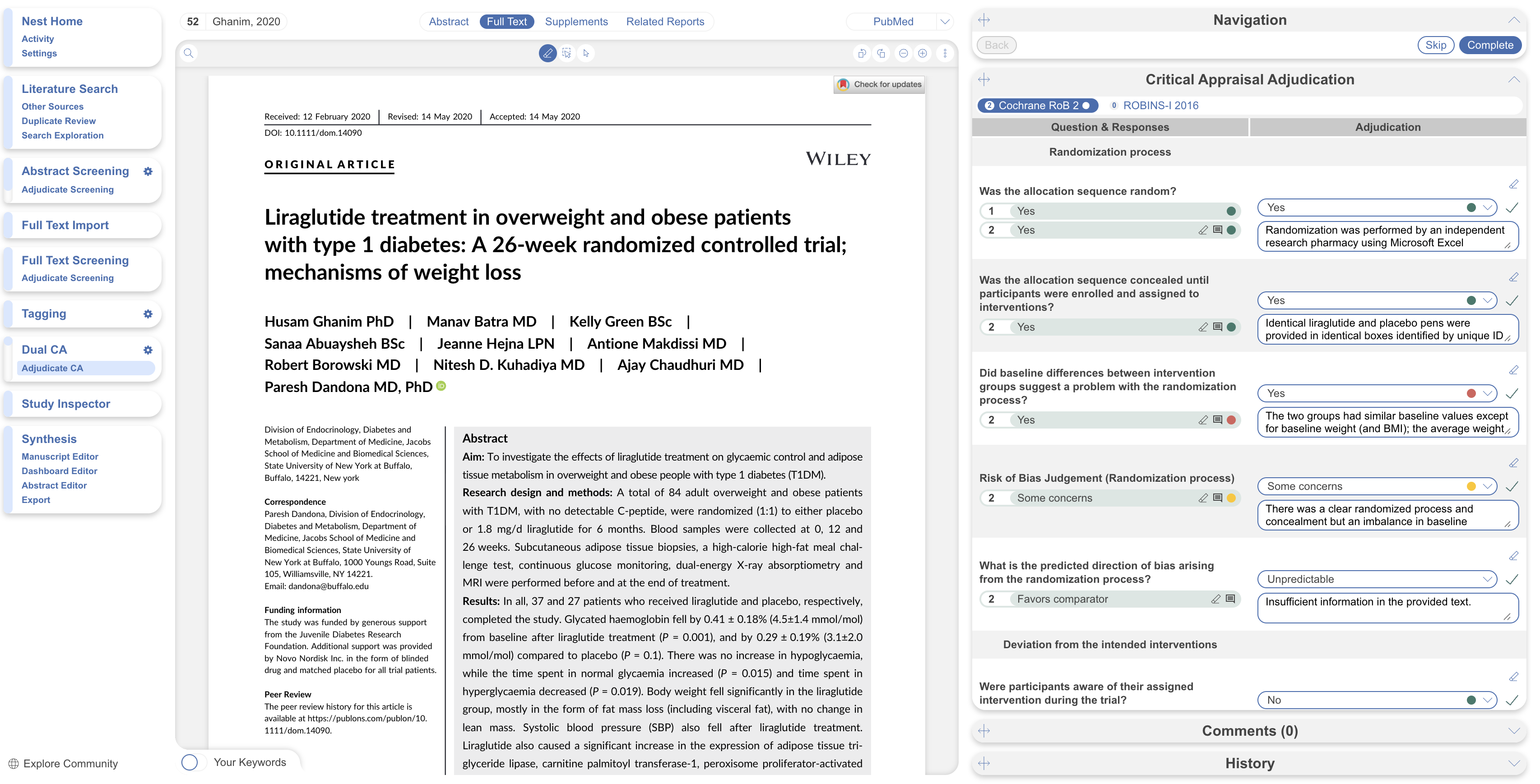
Adjudicate Critical Appraisal resolves a disagreement between two independent appraisals of the same study against the same tool's domains or items — the appraisal equivalent of **Adjudicate Records**.

<figure><img src="https://305208404-files.gitbook.io/~/files/v0/b/gitbook-x-prod.appspot.com/o/spaces%2Fxb7uNGATUgwQAjDVQRXG%2Fuploads%2FsGRnoAZdnNAsv8MzfnYn%2FScreenshot%202026-08-20%20at%2011.55.53.png?alt=media&amp;token=b4ac3812-5a9d-4bfd-96c1-c95040385b85" alt="The Adjudicate Critical Appraisal page showing two appraisers&#x27; ratings for each assessment item."><figcaption><p>Compare the two appraisers' ratings and select the final rating.</p></figcaption></figure>

**Adjudicate a domain**

1. Open **Adjudicate CA page**.
2. Select the first assessment, if multiple were used.
3. Compare both appraisers' ratings and any supporting rationale each left. Agreements are displayed in green, disagreements in red.
4. Check the source study yourself, and any reviewer annotations.
5. Select the Final answer and apply an annotation is necessary.
6. Select Complete to move to the next study.

The adjudicator's rating becomes the domain's final rating for that study — it doesn't average or split the difference between the two original ratings.

### FAQs

<details>

<summary>Can I appraise a study before it's tagged or extracted?</summary>

Yes. As soon as a study is included it will appear in the Critical Appraisal queue. You can also use Study Inspector.

</details>

<details>

<summary>Can I switch a study's scope from Entire Study to by-outcome after I've already appraised it as a whole?</summary>

Yes. Answers are saved if you switch back.

</details>

<details>

<summary>Do I need a study's full text uploaded before I can appraise it?</summary>

It is recommended but not technically required. Smart Critical Appraisal only generates recommendations for studies with an uploaded full text.

</details>

<details>

<summary>Can I use more than one appraisal system in the same nest?</summary>

Yes — enable as many systems as your review's study designs call for. Each appears as its own tab in the module.

</details>

### Next Steps

<table data-card-size="large" data-view="cards"><thead><tr><th></th><th></th><th data-hidden data-card-target data-type="content-ref"></th></tr></thead><tbody><tr><td><i class="fa-chart-simple">:chart-simple:</i><br><strong>Critical Appraisal Visuals</strong></td><td>View stoplight diagrams and domain-distribution outputs.</td><td><a href="/review-workflow/synthesis/navigate-synthesis-outputs/critical-appraisal-outputs.md">Critical Appraisal Outputs</a></td></tr><tr><td><i class="fa-hand-pointer">:hand-pointer:</i><br><strong>Living Outputs</strong></td><td>Explore the outputs generated from your review.</td><td><a href="/review-workflow/synthesis.md">Synthesis</a></td></tr><tr><td><i class="fa-magnifying-glass">:magnifying-glass:</i><br><strong>Study Inspector</strong></td><td>Find, filter, and edit studies in your nest.</td><td><a href="/review-workflow/study-inspector.md">Study Inspector</a></td></tr><tr><td><i class="fa-file-arrow-down">:file-arrow-down:</i><br><strong>Exports</strong></td><td>Download appraisal data and other review outputs.</td><td><a href="/review-workflow/exports.md">Exports</a></td></tr></tbody></table>


---

# Agent Instructions
This documentation is published with GitBook. GitBook is the documentation platform designed so that both humans and AI agents can read, navigate, and reason over technical content effectively. Learn more at gitbook.com.

## Querying This Documentation
If you need additional information that is not directly available in this page, you can query the documentation by asking a question.

Perform an HTTP GET request on the following URL with the `ask` and `goal` query parameters:

```
GET https://docs.nested-knowledge.com/review-workflow/critical-appraisal/appraise-studies.md?ask=<question>&goal=<user_goal>
```

`ask` is the immediate question: it should be specific, self-contained, and written in natural language.
`goal` is what the user is ultimately trying to achieve, the reason they need the answer. Sharing it helps GitBook give you a better, more relevant answer. A goal is most helpful when it describes the outcome the user wants rather than restating the question. For example, with `ask=how do I create an API token`, a goal like `automate deployments from our CI pipeline` lets GitBook tailor the answer to that use case.

The response will contain a direct answer to the question and relevant excerpts and sources from the documentation.

Use this mechanism when the answer is not explicitly present in the current page, you need clarification or additional context, or you want to retrieve related documentation sections.