> For the complete documentation index, see [llms.txt](https://docs.nested-knowledge.com/llms.txt). Markdown versions of documentation pages are available by appending `.md` to page URLs; this page is available as [Markdown](https://docs.nested-knowledge.com/review-workflow/synthesis/navigate-synthesis-outputs/dashboard-in-synthesis.md).

# Dashboard in Synthesis

Learn how to navigate the Dashboard page in Synthesis.

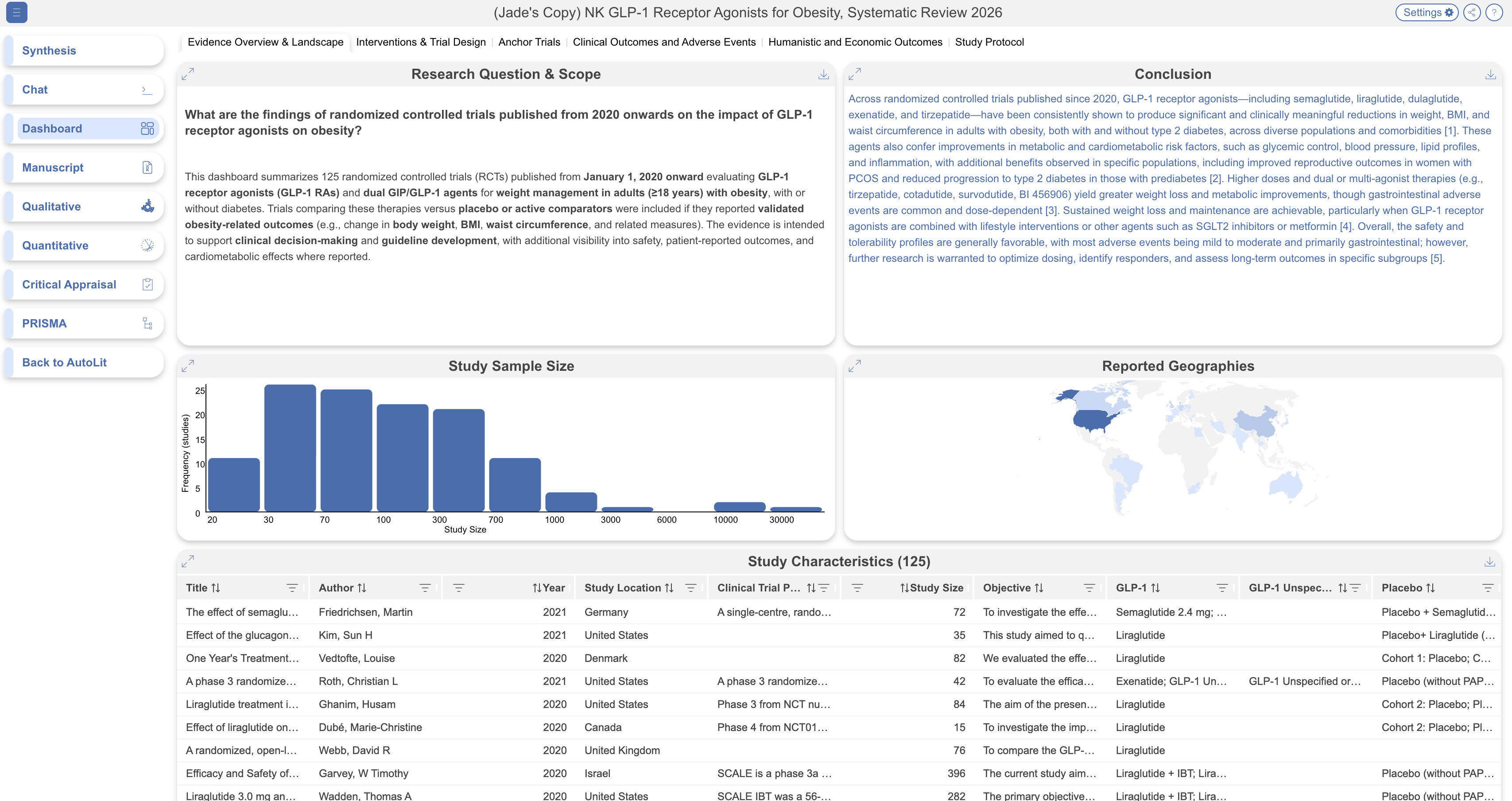
A Dashboard is a curated set of living, up-to-date visual summaries — text, tables, charts, and highlighted studies — that a reviewer has put together to give you an at-a-glance view of a review's findings, without needing to dig through the raw data yourself. This page shows exactly what the reviewer built, kept current as their review progresses.

<figure><img src="https://305208404-files.gitbook.io/~/files/v0/b/gitbook-x-prod.appspot.com/o/spaces%2Fxb7uNGATUgwQAjDVQRXG%2Fuploads%2FfFQ4WcmrXZ0grAvIM3aH%2Fdashboard%20in%20synthesis.png?alt=media&amp;token=08746416-56d2-4709-8af6-24c4377c6b6b" alt="The Synthesis Dashboard showing a grid of cards with review findings."><figcaption><p>The Synthesis Dashboard displays curated cards for a review's findings.</p></figcaption></figure>

### What You Can Do Here

* **Expand** any card into a larger view, including resizing table columns within a table card.
* **View descriptions** by hovering the "i" icon on a card, if the reviewer added context.
* **Download** individual cards where available — text cards as a Word document, table cards as a spreadsheet, image and chart cards as an image file. Download isn't currently available for study or topic cards; for those, a screenshot is the fallback.
* **Follow links** — any link inside a table card leads out to its destination as normal.

### Table Cards

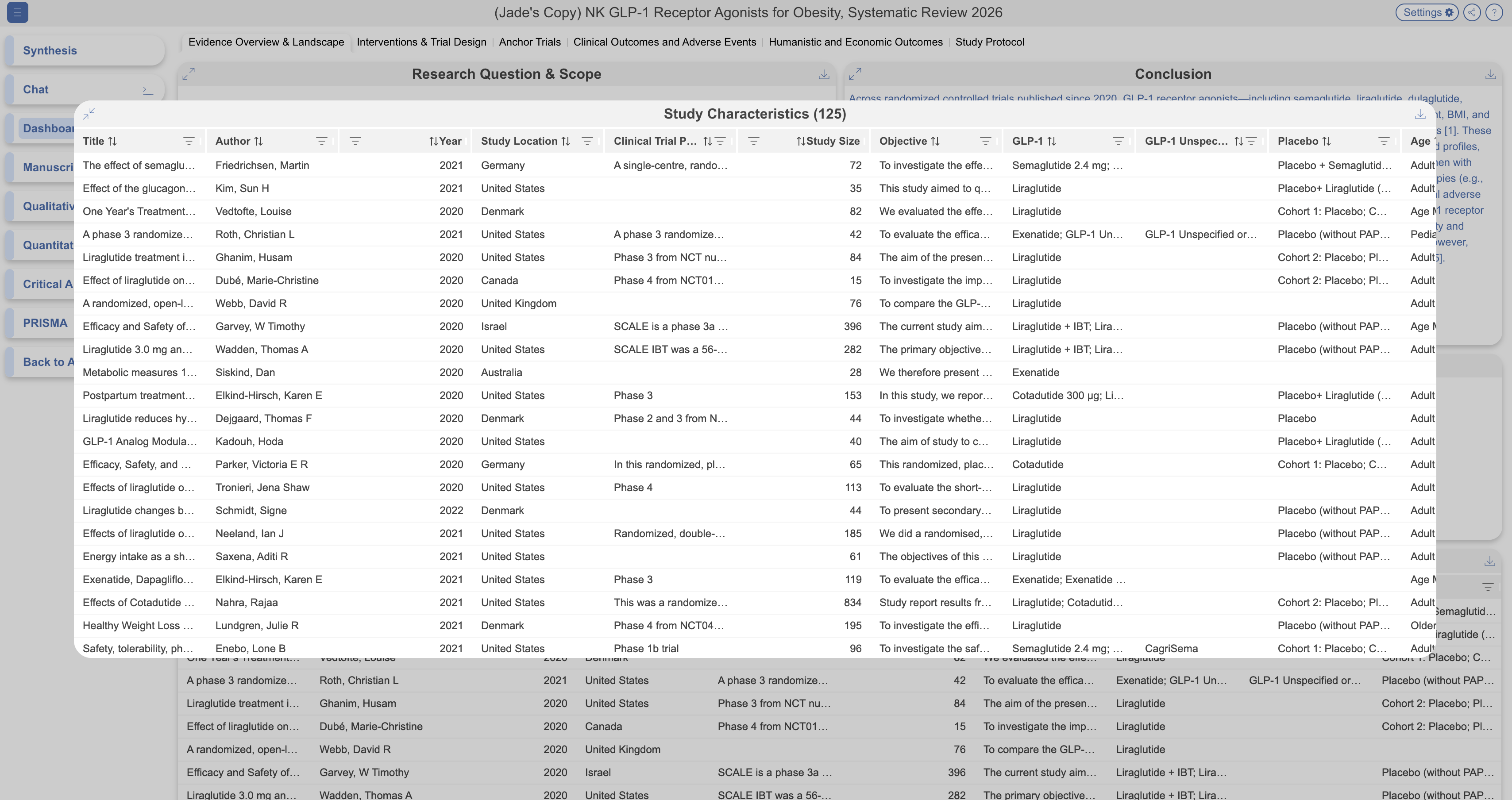
Expand table cards to investigate data. Select individual rows to take a look at the study and all extracted data. Download the table for a complete viewing experience and further analyses.

<figure><img src="https://305208404-files.gitbook.io/~/files/v0/b/gitbook-x-prod.appspot.com/o/spaces%2Fxb7uNGATUgwQAjDVQRXG%2Fuploads%2FUFFAe3UqyWzG1huKFxk3%2Ftable%20card%20in%20dashboard.png?alt=media&amp;token=92e868e8-ccab-4b80-a26c-03ac7c199738" alt="An expanded table card in Synthesis showing extracted study data in rows and columns."><figcaption><p>Expand a table card to review its extracted study data.</p></figcaption></figure>

### Insight Cards

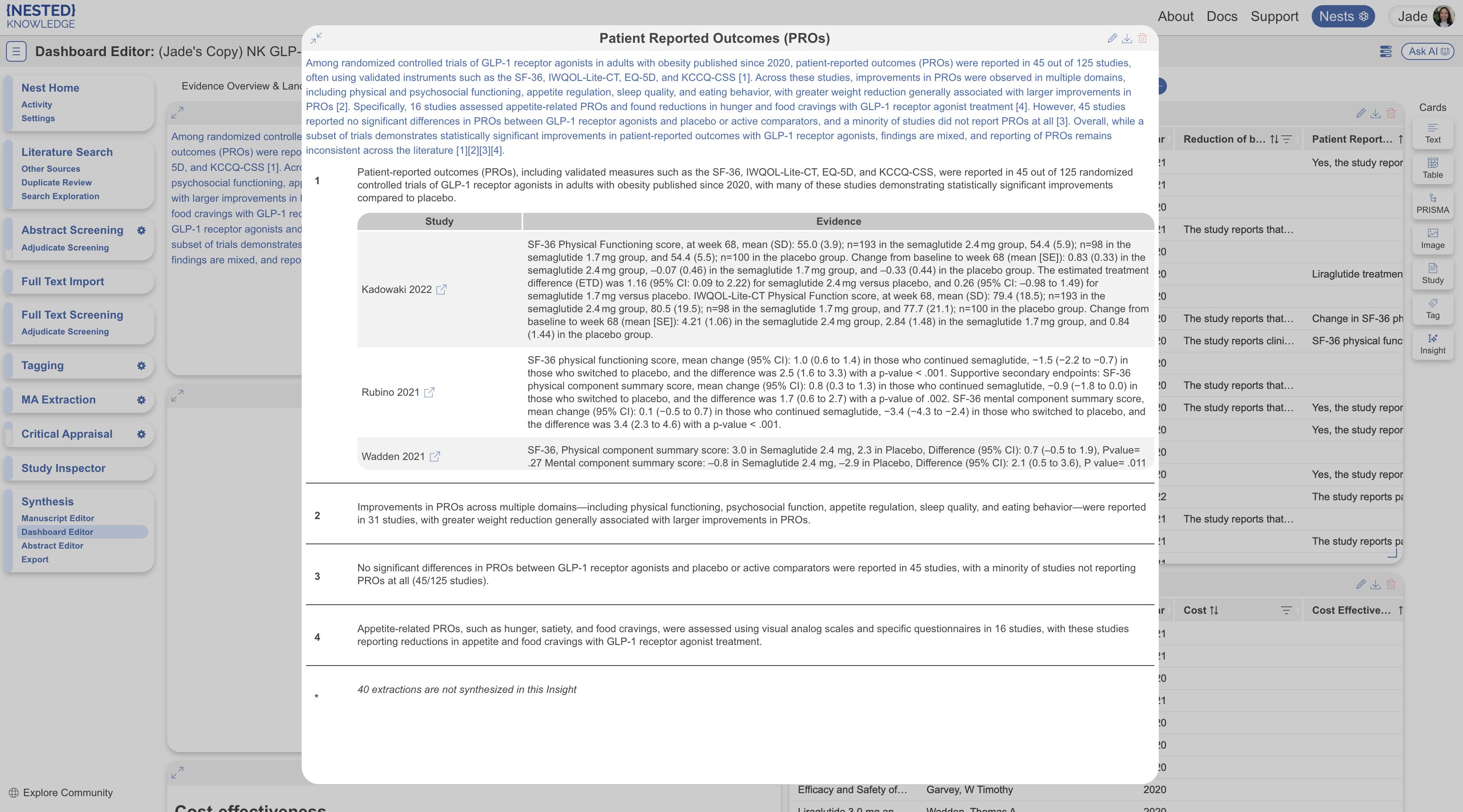
Smart Insights can be distinguised from plain text cards as they contain blue text. Expand these cards to view the full insight, cited claims and underlying evidence. Select individual studies to view each study and extracted data in detail. Download the individual insight as a word document. It will contain all claims, sources and cited evidence.

<figure><img src="https://305208404-files.gitbook.io/~/files/v0/b/gitbook-x-prod.appspot.com/o/spaces%2Fxb7uNGATUgwQAjDVQRXG%2Fuploads%2FNBI2304o1dnKUV1WsQYY%2Finteract%20smart%20insight.png?alt=media&amp;token=5c263f4f-2a06-42e0-83b8-54c499e10dab" alt="An expanded Smart Insights card in Synthesis showing cited claims and supporting evidence."><figcaption><p>Expand a Smart Insights card to review its claims and supporting evidence.</p></figcaption></figure>

### Filters And Sharing

Filters that apply elsewhere in Synthesis (see [Filters on Synthesis](/review-workflow/synthesis/navigate-synthesis-outputs/filters-on-synthesis.md)) do **not** apply to Dashboard — it's already built from exactly the studies and data the reviewer chose, so a separate filtering layer isn't offered here.

Like the rest of Synthesis, this page can be shared further by link or QR code, using the share icon in the top right, provided the reviewer has made the review Public or Protected.

### FAQs

<details>

<summary>Why don't I see a filter option here?</summary>

Dashboard and Manuscript are the two Synthesis pages that filters don't apply to — see [Filters on Synthesis](/review-workflow/synthesis/navigate-synthesis-outputs/filters-on-synthesis.md) for why.

</details>

<details>

<summary>Can I edit what's shown here?</summary>

No — this page is read-only. If something needs to change, that happens on the reviewer's side, in what they call Dashboard Editor; reach out to them directly.

</details>

<details>

<summary>Do I need an account to view this?</summary>

No — if you've been sent a link, you can view and interact with this page without signing up.

</details>

### Next Steps

<table data-card-size="large" data-view="cards"><thead><tr><th></th><th></th><th data-hidden data-card-target data-type="content-ref"></th></tr></thead><tbody><tr><td><i class="fa-table-columns">:table-columns:</i><br><strong>Dashboard Editor</strong></td><td>Build or edit this Dashboard.</td><td><a href="/review-workflow/synthesis/set-up-synthesis-outputs/dashboard-editor.md">Dashboard Editor</a></td></tr><tr><td><i class="fa-sliders">:sliders:</i><br><strong>Filters on Synthesis</strong></td><td>Learn where Synthesis-wide filters apply.</td><td><a href="/review-workflow/synthesis/navigate-synthesis-outputs/filters-on-synthesis.md">Filters on Synthesis</a></td></tr></tbody></table>


---

# Agent Instructions
This documentation is published with GitBook. GitBook is the documentation platform designed so that both humans and AI agents can read, navigate, and reason over technical content effectively. Learn more at gitbook.com.

## Querying This Documentation
If you need additional information that is not directly available in this page, you can query the documentation by asking a question.

Perform an HTTP GET request on the following URL with the `ask` and `goal` query parameters:

```
GET https://docs.nested-knowledge.com/review-workflow/synthesis/navigate-synthesis-outputs/dashboard-in-synthesis.md?ask=<question>&goal=<user_goal>
```

`ask` is the immediate question: it should be specific, self-contained, and written in natural language.
`goal` is what the user is ultimately trying to achieve, the reason they need the answer. Sharing it helps GitBook give you a better, more relevant answer. A goal is most helpful when it describes the outcome the user wants rather than restating the question. For example, with `ask=how do I create an API token`, a goal like `automate deployments from our CI pipeline` lets GitBook tailor the answer to that use case.

The response will contain a direct answer to the question and relevant excerpts and sources from the documentation.

Use this mechanism when the answer is not explicitly present in the current page, you need clarification or additional context, or you want to retrieve related documentation sections.