> For the complete documentation index, see [llms.txt](https://docs.nested-knowledge.com/llms.txt). Markdown versions of documentation pages are available by appending `.md` to page URLs; this page is available as [Markdown](https://docs.nested-knowledge.com/review-workflow/synthesis/navigate-synthesis-outputs/prisma-chart.md).

# PRISMA Chart

Learn how to navigate and export the PRISMA in Synthesis.

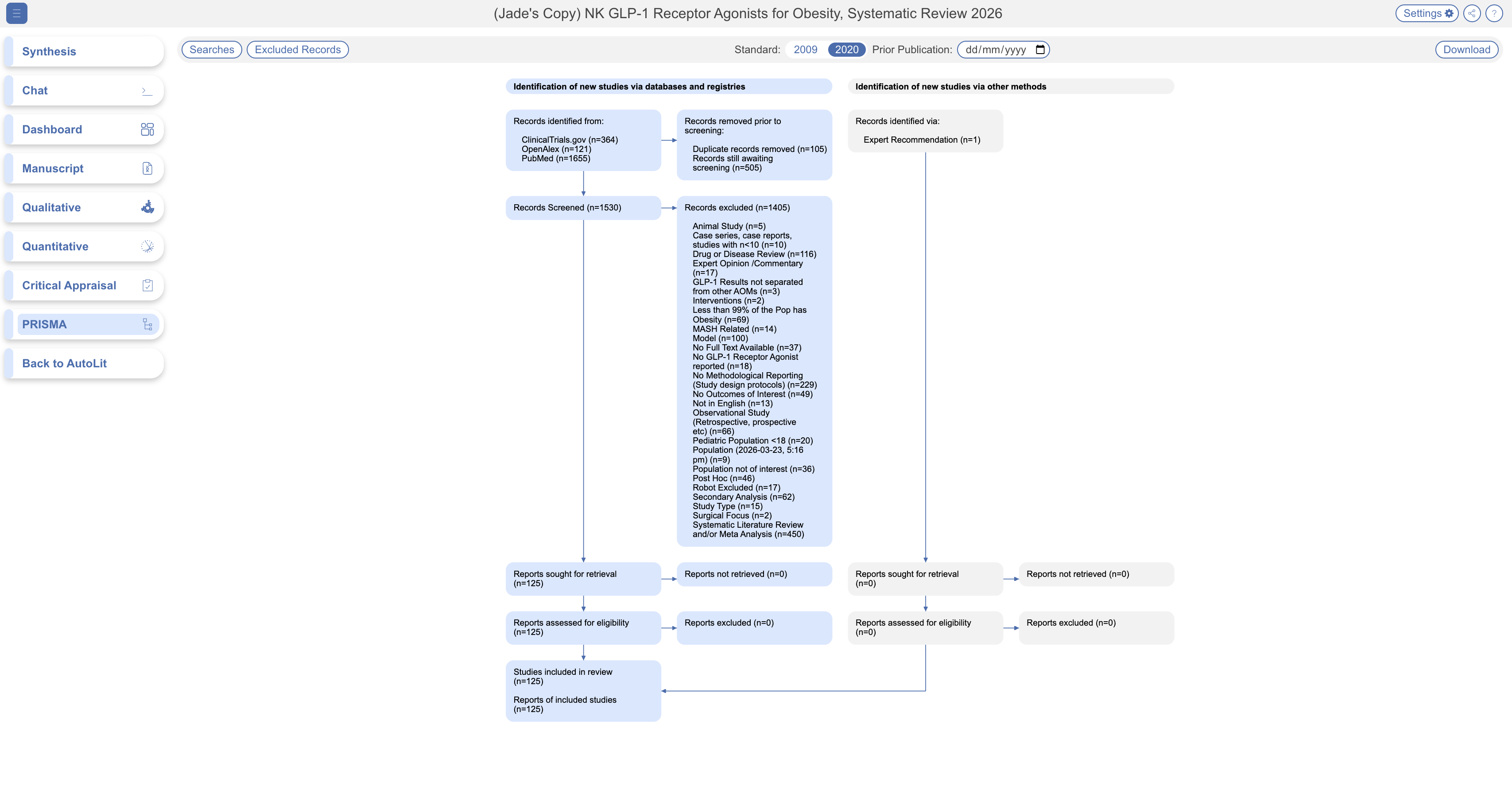
A PRISMA chart is a standardized flow diagram used across systematic reviews to show how reviewers got from their initial search results down to the studies actually included. Nested Knowledge builds this automatically from the reviewers' Screening record.

### Reading The Diagram

The diagram shows visibility into excluded records at every stage. Full Text Import and Screening appear across two rows: first, the number of full texts sought versus successfully found, then the number of records excluded at full text review, broken down by reason.&#x20;

The final box shows both **Included Studies** (unique groups of patients studied) and **Included Reports** (individual publications describing those groups).

<figure><img src="https://305208404-files.gitbook.io/~/files/v0/b/gitbook-x-prod.appspot.com/o/spaces%2Fxb7uNGATUgwQAjDVQRXG%2Fuploads%2FzPk9tOXoNQ9aLVnjnNj1%2Fprisma.png?alt=media&amp;token=5ecc3be5-55fb-4131-9737-8c874a74686c" alt="PRISMA flow diagram showing records identified, screened, excluded, and included in a systematic review"><figcaption><p>The PRISMA chart tracks records from search results through screening to included studies and reports.</p></figcaption></figure>

### Working With The Chart

* **Toggle PRISMA 2009 or 2020** — two versions of the same standard; 2020 is current and shown by default.
* **Adjust the date range** to see the chart as it looked at an earlier point — useful for a review that's still ongoing and gets updated over time.
* **Download** as an image file, choosing your resolution.
* **Excluded Records**, download all excluded studies or those excluded at the full text stage.
* **View Searches** run in this review.
* **Share** further via link or QR code, using the share icon in the top right.
* **Filter** to a specific subset of studies through **Settings** — see [Filters on Synthesis](/review-workflow/synthesis/navigate-synthesis-outputs/filters-on-synthesis.md).

### FAQs

<details>

<summary>What's the difference between PRISMA 2009 and 2020?</summary>

Both are versions of the same standardized reporting format; 2020 is the current standard and reflects a more detailed breakdown of exclusions. Which one you see depends on what the reviewer selected or what their target use requires.

</details>

<details>

<summary>Do I need to understand systematic review methodology to read this?</summary>

No — the diagram is meant to be self-explanatory as a flow from "records found" to "records included." If you want the full methodology behind PRISMA reporting, the PRISMA statement is the authoritative source, but nothing here requires reading it first.

</details>

<details>

<summary>Can I edit the PRISMA diagram?</summary>

You can edit only the name of the [**Other sources**](/review-workflow/literature-search/other-sources.md#set-the-prisma-source) box. You cannot edit other parts of the PRISMA diagram. This is intentional: the diagram shows exactly what occurred in your nest, so it stays accurate and auditable.

If you must make other changes, download the diagram and edit it outside of Nested Knowledge.

</details>

### Next Steps

<table data-card-size="large" data-view="cards"><thead><tr><th></th><th></th><th data-hidden data-card-target data-type="content-ref"></th></tr></thead><tbody><tr><td><i class="fa-sliders">:sliders:</i><br><strong>Filters On Synthesis</strong></td><td>Filter the chart to a subset of studies.</td><td><a href="/review-workflow/synthesis/navigate-synthesis-outputs/filters-on-synthesis.md">Filters on Synthesis</a></td></tr><tr><td><i class="fa-file-lines">:file-lines:</i><br><strong>Manuscript Editor</strong></td><td>Insert this diagram in a written report.</td><td><a href="/review-workflow/synthesis/set-up-synthesis-outputs/manuscript-editor.md">Manuscript Editor</a></td></tr></tbody></table>


---

# Agent Instructions
This documentation is published with GitBook. GitBook is the documentation platform designed so that both humans and AI agents can read, navigate, and reason over technical content effectively. Learn more at gitbook.com.

## Querying This Documentation
If you need additional information that is not directly available in this page, you can query the documentation by asking a question.

Perform an HTTP GET request on the following URL with the `ask` and `goal` query parameters:

```
GET https://docs.nested-knowledge.com/review-workflow/synthesis/navigate-synthesis-outputs/prisma-chart.md?ask=<question>&goal=<user_goal>
```

`ask` is the immediate question: it should be specific, self-contained, and written in natural language.
`goal` is what the user is ultimately trying to achieve, the reason they need the answer. Sharing it helps GitBook give you a better, more relevant answer. A goal is most helpful when it describes the outcome the user wants rather than restating the question. For example, with `ask=how do I create an API token`, a goal like `automate deployments from our CI pipeline` lets GitBook tailor the answer to that use case.

The response will contain a direct answer to the question and relevant excerpts and sources from the documentation.

Use this mechanism when the answer is not explicitly present in the current page, you need clarification or additional context, or you want to retrieve related documentation sections.
