> For the complete documentation index, see [llms.txt](https://docs.nested-knowledge.com/llms.txt). Markdown versions of documentation pages are available by appending `.md` to page URLs; this page is available as [Markdown](https://docs.nested-knowledge.com/review-workflow/synthesis/set-up-synthesis-outputs/abstract-editor/smart-abstract.md).

# Smart Abstract

Learn how to use Smart Abstract to generate an abstract for your nest.

Use Smart Abstract to generates a structured abstract — Methods, Results, and Discussion — drawn entirely from the data in your review.&#x20;

### Before You Start

Smart Abstract uses your searches, included records and applied tags for your methods. Smart Insights must be run to produce the results and discussion sections. Ensure these are complete before starting.

### What It Produces

* **Methods** — templated rather than AI-generated, so key methodological details (workflow configuration, searches, screening and tagging setup, and any AI tools used) are reported consistently every time.
* **Results** — If no Insights or Smart Insights exist yet, this section falls back to search and screening outcomes plus a short summary of extracted data.
* **Discussion** — interpretation of findings, including evidence gaps and limitations, informed by critical appraisal and Insights.

Smart Abstract is grounded exclusively in your review's own data — it does not draw on outside sources — and deliberately avoids editorializing or padding (there is no generated introduction section, for example).

### Generating Your Abstract

1. Navigate to **Abstract Editor**, under Synthesis.
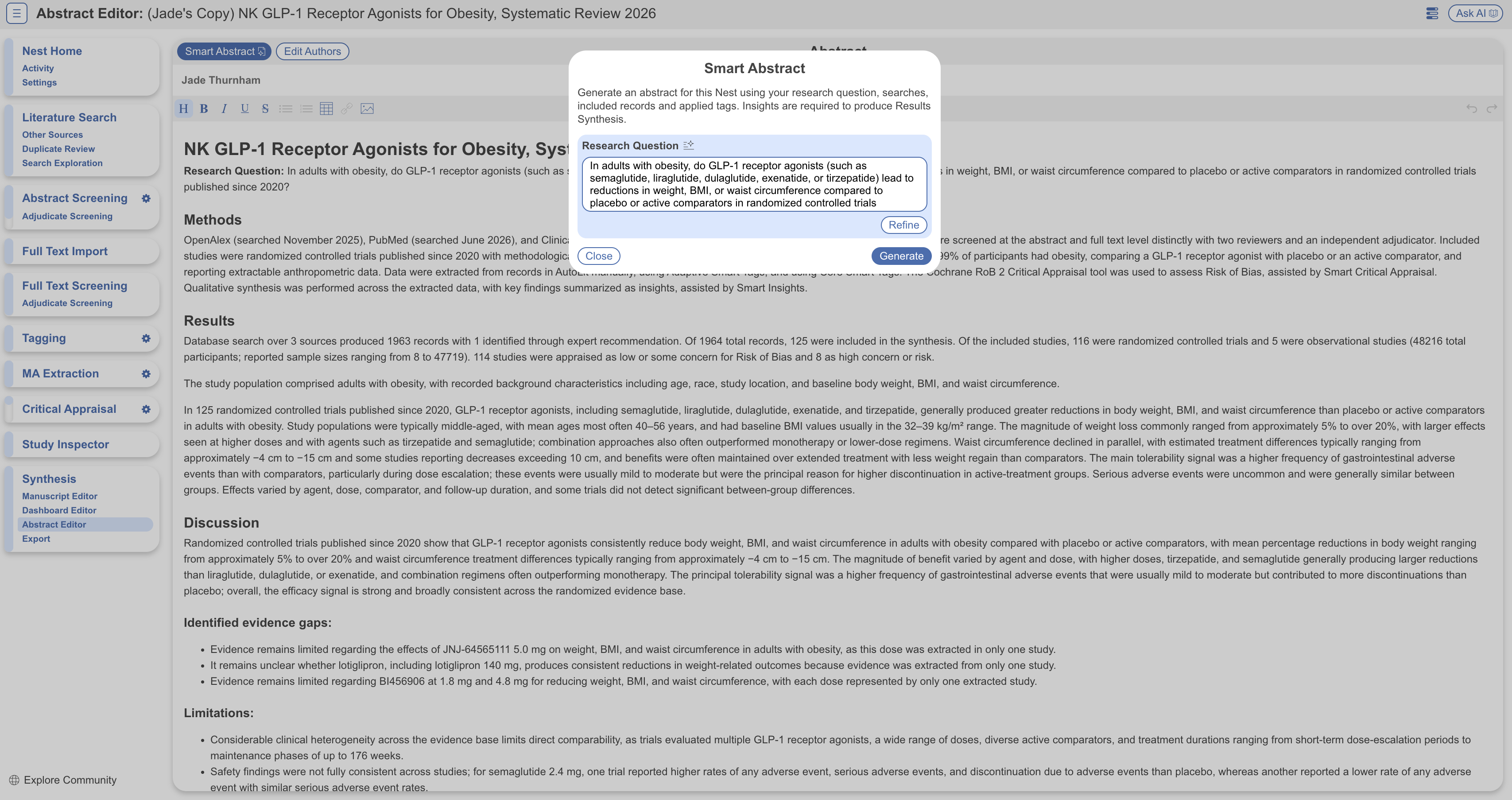
2. Select **Smart Abstract** in the top left. If you've entered a Research Question for the nest, it's pre-filled; otherwise, enter one before generating.
3. Review the output in the editor, editing and refining as you would a manually written abstract.

Generating **overwrites any existing abstract** — copy out anything you want to keep first.

<figure><img src="https://305208404-files.gitbook.io/~/files/v0/b/gitbook-x-prod.appspot.com/o/spaces%2Fxb7uNGATUgwQAjDVQRXG%2Fuploads%2FZUWVhmh2zAHpDNJK0eop%2Fsmart%20abstract.png?alt=media&amp;token=394b36ac-cb97-43bc-94d5-f67060c0fd5e" alt="The Abstract Editor with the Smart Abstract option selected."><figcaption><p>Select <strong>Smart Abstract</strong> in <strong>Abstract Editor</strong> to generate a structured abstract from your review data.</p></figcaption></figure>

### Prerequisites

Smart Abstract needs the nest to have progressed through a few essential steps — for example, it won't run on a nest with no records or no included studies. If prerequisites are missing, Smart Abstract identifies what's needed before it can generate.

### Regenerating

Regenerate whenever the nest has moved on — more records screened, appraisal completed, new Insights generated, or a changed tagging hierarchy — since the abstract reflects the nest's state only at the moment of generation. You'll be warned before a regeneration overwrites the existing abstract.

### FAQs

<details>

<summary>How do I get a fuller abstract with more findings?</summary>

Generate [**Smart Insights**](/review-workflow/synthesis/set-up-synthesis-outputs/smart-insights.md) first, then regenerate. Smart Abstract highlights insights and claims that most directly address your Research Question — without them, the Results section falls back to search, screening, and extraction outcomes only.

</details>

<details>

<summary>Will Smart Abstract use information from outside my nest?</summary>

No — it is grounded exclusively in your review's own extracted data.

</details>

### Next Steps

<table data-card-size="large" data-view="cards"><thead><tr><th></th><th></th><th data-hidden data-card-target data-type="content-ref"></th></tr></thead><tbody><tr><td><i class="fa-file-signature">:file-signature:</i><br><strong>Abstract Editor</strong></td><td>Generate, edit, and publish your abstract.</td><td><a href="/review-workflow/synthesis/set-up-synthesis-outputs/abstract-editor.md">Abstract Editor</a></td></tr><tr><td><i class="fa-wand-magic-sparkles">:wand-magic-sparkles:</i><br><strong>Smart Insights</strong></td><td>Generate evidence-linked findings for a fuller abstract.</td><td><a href="/review-workflow/synthesis/set-up-synthesis-outputs/smart-insights.md">Smart Insights</a></td></tr><tr><td><i class="fa-file-lines">:file-lines:</i><br><strong>Manuscript Editor</strong></td><td>Draft a full narrative beyond the abstract.</td><td><a href="/review-workflow/synthesis/set-up-synthesis-outputs/manuscript-editor.md">Manuscript Editor</a></td></tr></tbody></table>


---

# Agent Instructions
This documentation is published with GitBook. GitBook is the documentation platform designed so that both humans and AI agents can read, navigate, and reason over technical content effectively. Learn more at gitbook.com.

## Querying This Documentation
If you need additional information that is not directly available in this page, you can query the documentation by asking a question.

Perform an HTTP GET request on the following URL with the `ask` and `goal` query parameters:

```
GET https://docs.nested-knowledge.com/review-workflow/synthesis/set-up-synthesis-outputs/abstract-editor/smart-abstract.md?ask=<question>&goal=<user_goal>
```

`ask` is the immediate question: it should be specific, self-contained, and written in natural language.
`goal` is what the user is ultimately trying to achieve, the reason they need the answer. Sharing it helps GitBook give you a better, more relevant answer. A goal is most helpful when it describes the outcome the user wants rather than restating the question. For example, with `ask=how do I create an API token`, a goal like `automate deployments from our CI pipeline` lets GitBook tailor the answer to that use case.

The response will contain a direct answer to the question and relevant excerpts and sources from the documentation.

Use this mechanism when the answer is not explicitly present in the current page, you need clarification or additional context, or you want to retrieve related documentation sections.
