> For the complete documentation index, see [llms.txt](https://docs.nested-knowledge.com/llms.txt). Markdown versions of documentation pages are available by appending `.md` to page URLs; this page is available as [Markdown](https://docs.nested-knowledge.com/review-workflow/tagging/ai-tools-in-tagging/smart-config-tagging.md).

# Smart Config: Tagging

Learn how to generate a custom tag hierarchy with Smart Config.

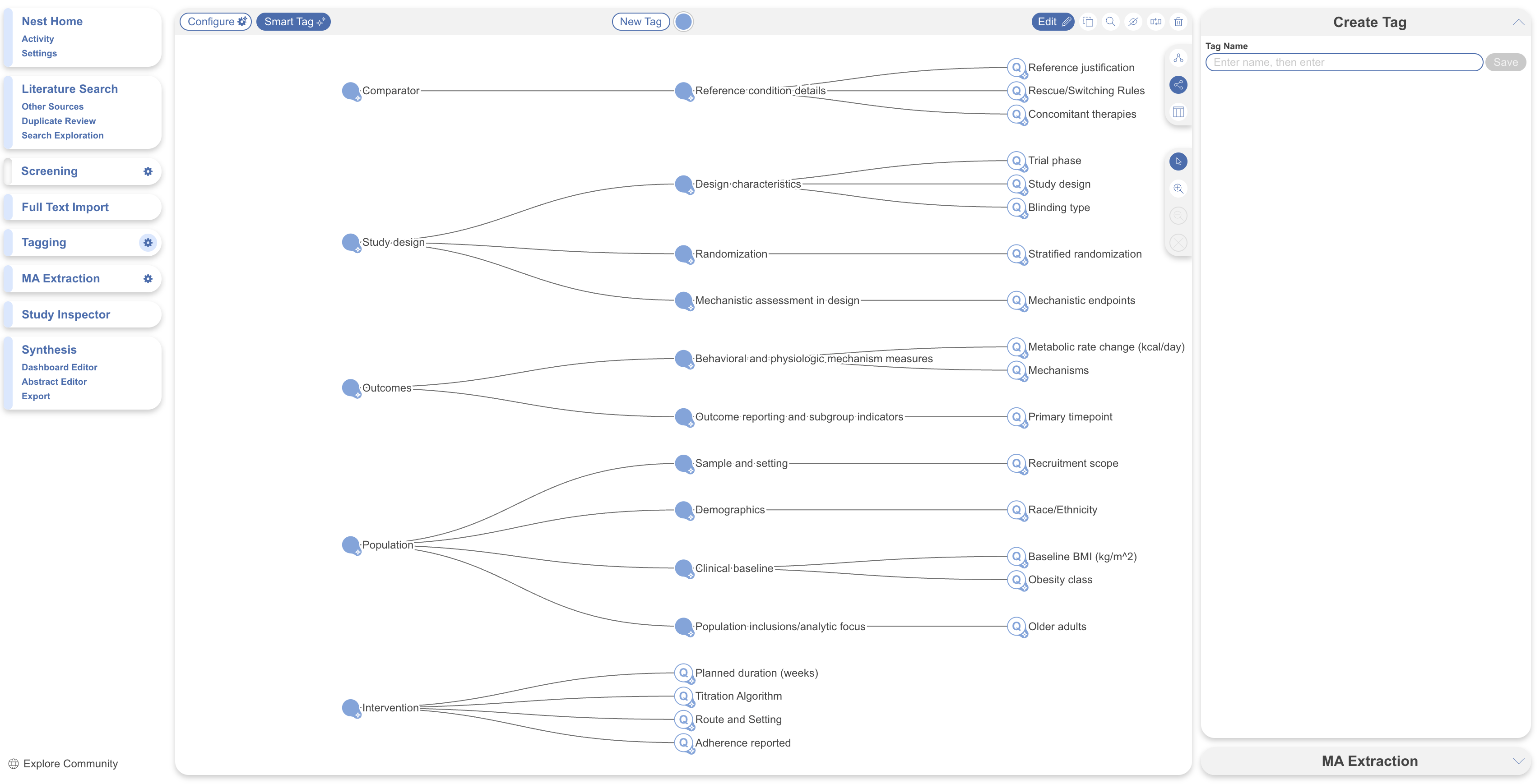
**Smart Config: Tagging** generates a custom, multilevel extraction hierarchy from your research question. It creates root concepts such as Study Design, Outcomes, and Intervention. Each is configured as a Single Apply question.

**Core Smart Tags** runs across every record with a fixed set of concepts. **Smart Config** creates a framework for the studies you've included and your specific review.

**Smart Config** builds the framework only—it doesn't extract data. Review and refine the generated hierarchy. Then extract data with [Adaptive Smart Tags.](/review-workflow/tagging/ai-tools-in-tagging/adaptive-smart-tags.md) Use it when you need a new extraction hierarchy. It is useful for rapid and scoping reviews. See [conduct a rapid review.](/get-started/ai-documentation/conduct-a-rapid-review.md)

### Generate A Tag Hierarchy With Smart Config

{% stepper %}
{% step %}

#### Open Configure Tagging <i class="fa-gear">:gear:</i>

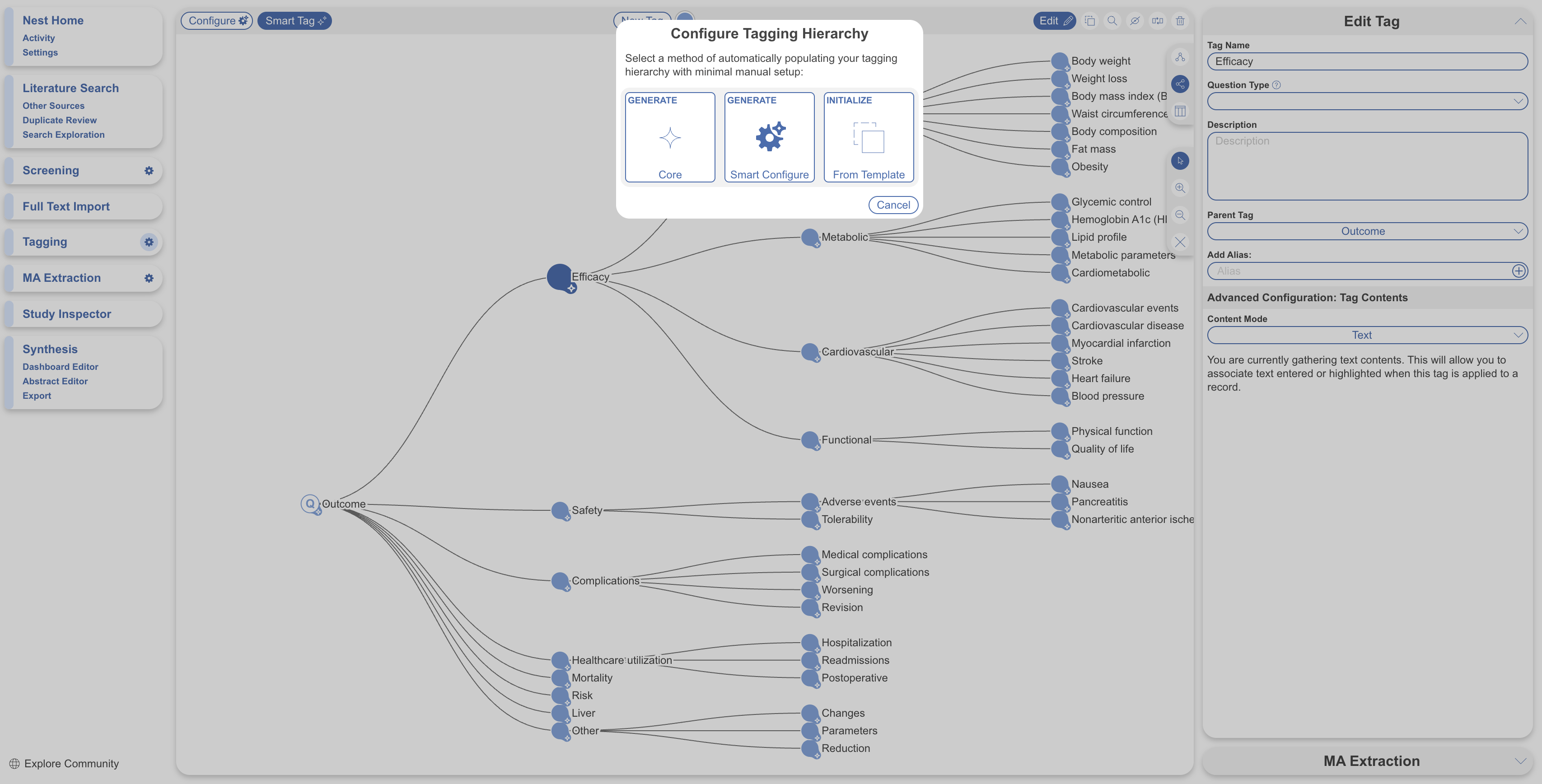
Open **Configure Tagging** <i class="fa-gear">:gear:</i> page. Select **Configure.**
{% endstep %}

{% step %}

#### Open The Smart Config Modal

Select **Generate Smart Configure.**

<figure><img src="https://305208404-files.gitbook.io/~/files/v0/b/gitbook-x-prod.appspot.com/o/spaces%2Fxb7uNGATUgwQAjDVQRXG%2Fuploads%2F6yi19nVSpBdjbx8quL9N%2Fsmart%20config%20.png?alt=media&amp;token=02c286b6-ac32-4bdb-8b46-644d7ff125b3" alt="The Configure Tagging page with the Generate Smart Configure option."><figcaption><p>Select <strong>Generate Smart Configure</strong> to open the Smart Config modal.</p></figcaption></figure>
{% endstep %}

{% step %}

#### Confirm Or Refine Your Research Question

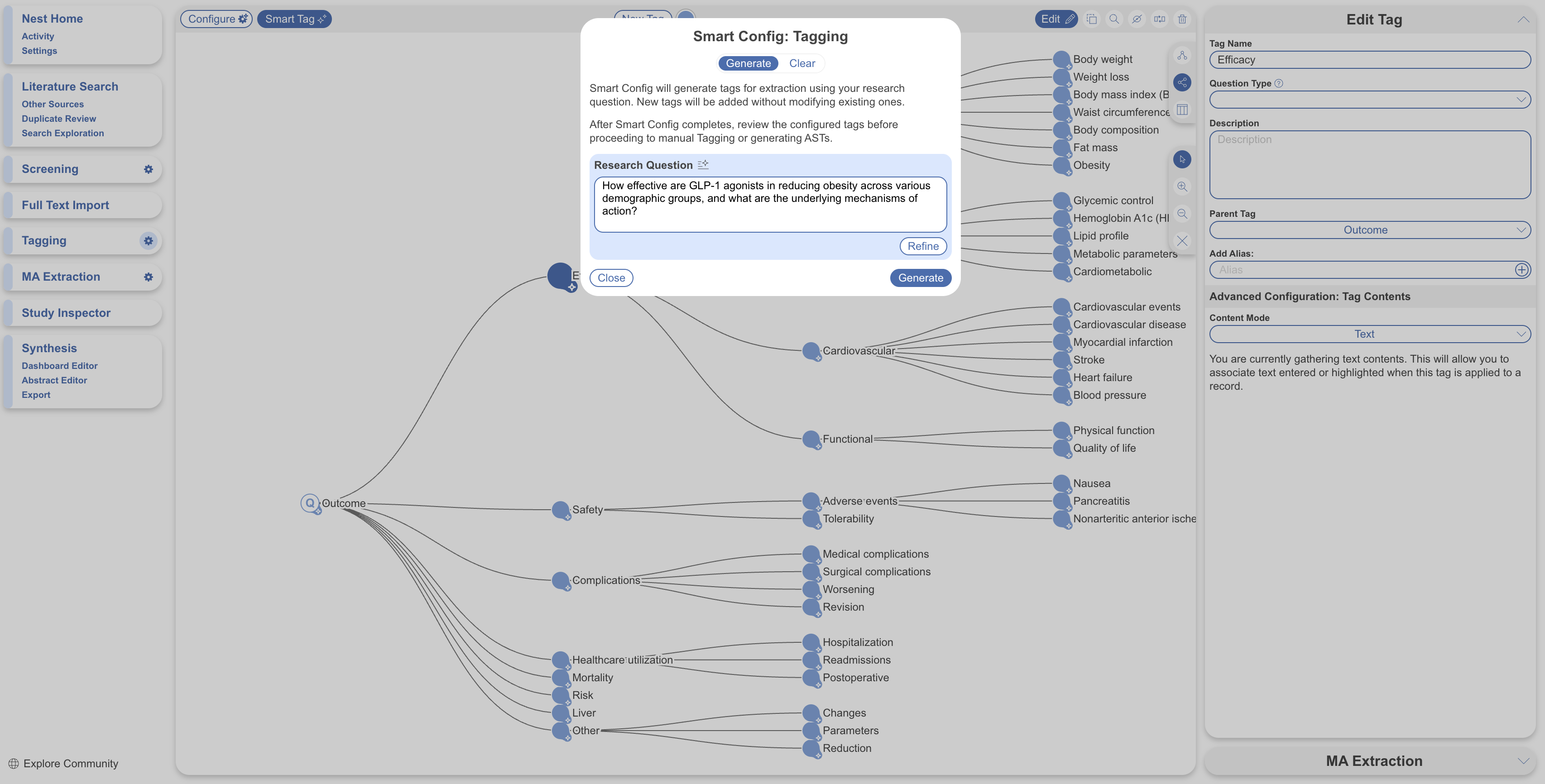
If you've used Smart Search, Smart Config: Screening, or Core Smart Tags, the Research Question field is prepopulated. Otherwise, enter your question. Edit the question or select **Refine** before generating.

<figure><img src="https://305208404-files.gitbook.io/~/files/v0/b/gitbook-x-prod.appspot.com/o/spaces%2Fxb7uNGATUgwQAjDVQRXG%2Fuploads%2F53bpyaAZhCxB7I7gD3tS%2Fsmart%20config%20tagging.png?alt=media&amp;token=c3407bce-c3a3-4df7-a396-323d00ca860f" alt="The Smart Config modal showing the Research Question field and Refine button."><figcaption><p>Review, edit, or refine the research question before generating the hierarchy.</p></figcaption></figure>
{% endstep %}

{% step %}

#### Generate

Select **Generate**. Smart Config produces a multilevel hierarchy grouped under root concepts. Examples include Study Design, Outcomes, and Intervention. Each generated tag uses a Single Apply question. Each study receives one answer per tag. This question type works with [Smart Insights](/review-workflow/synthesis/set-up-synthesis-outputs/smart-insights.md) after [Adaptive Smart Tags](/review-workflow/tagging/ai-tools-in-tagging/adaptive-smart-tags.md) extracts data.

<figure><img src="https://305208404-files.gitbook.io/~/files/v0/b/gitbook-x-prod.appspot.com/o/spaces%2Fxb7uNGATUgwQAjDVQRXG%2Fuploads%2FZJeLgx4wU6zwhB71P1XA%2FScreenshot%202026-08-20%20at%2009.33.14.png?alt=media&amp;token=243b73a0-1499-48e2-9045-ed070687a60a" alt="A Smart Config-generated tag hierarchy organized under root concepts."><figcaption><p>Smart Config generates a multilevel tag hierarchy under root concepts.</p></figcaption></figure>
{% endstep %}
{% endstepper %}

### Review And Edit The Generated Hierarchy

{% hint style="info" %}
**Smart Config** doesn't extract data. This differs from **Core Smart Tags**. Review and refine the generated hierarchy before using **Adaptive Smart Tags**.
{% endhint %}

Typical refinements at this stage:

* Rename tags to match your team's terminology or the language of your extraction template.
* Adjust the hierarchy. Drag tags to different parents, merge duplicates, or remove tags outside your review scope.
* Edit question text for **Adaptive Smart Tags**. Specify units, expected formats, or constraints.
* Change the question type if **Single Apply** isn't the right fit. For example, use **Multi-Select** for tags with more than one answer per study.
* Add child tags to capture sub-concepts the AI didn't surface.

For tag-level configuration, including question types, descriptions, aliases, and child tags, see [Configure Tagging](/review-workflow/tagging/configure-tagging.md).

### Extract With Adaptive Smart Tags

After reviewing the hierarchy, extract data with [Adaptive Smart Tags](/review-workflow/tagging/ai-tools-in-tagging/adaptive-smart-tags.md). It works with **Smart Config**-generated tags. Unlike **Core Smart Tags**, **Adaptive Smart Tags** works on abstracts and full texts. It supports custom questions of any structure. Choose **High Fidelity** mode when extraction accuracy matters more than turnaround time. It requires additional processing time.

After Adaptive Smart Tags has run, extracted tag contents are visible in three places:

* On the **Tagging** page itself, alongside each study's abstract or full text.
* In [Study Inspector](/review-workflow/study-inspector.md), where you can filter by tag or tag content. You can also apply bulk actions to the filtered studies.
* In the [**Examine** tool](/review-workflow/tagging/configure-tagging.md#examine-applied-tags-at-a-glance) on the tag hierarchy. It shows extracted content for a selected tag and its child tags.

Review AI extraction outputs. Edits in **Study Inspector** or on the **Tagging** page update the tag. They appear in downstream views and exports.

The typical workflow is **Research Question → Smart Config → review and edit tags → Adaptive Smart Tags → review in Study Inspector → Smart Insights**.

### Re-Running Smart Config

Running **Smart Config** again recreates the entire generated hierarchy. It doesn't add tags to the existing hierarchy. **Smart Config** doesn't extract data, so regenerating doesn't remove data it created. However, you can lose manual edits to the previous hierarchy and extraction run against it with **Adaptive Smart Tags**. This includes renamed tags, adjusted questions, and added child tags. Merge changes you want to keep into the new hierarchy before deleting the old one. Follow the same process as when you regenerate **Core Smart Tags**.

### Prompt Guidance: Tagging

How a tag's question is worded affects how well Smart Config: Tagging and Adaptive Smart Tags can work with it. See [Prompt Guidance](/ai-transparency/ai-in-nested-knowledge/prompt-guidance.md) before finalizing wording on anything you plan to build or extract with AI.

### FAQs

<details>

<summary>Does Smart Config extract data as well as build the hierarchy?</summary>

No. **Smart Config** drafts the tag structure and question wording. Extract data separately with **Adaptive Smart Tags**.

</details>

<details>

<summary>What happens if I run Smart Config again after already editing the hierarchy?</summary>

Regenerating recreates the entire hierarchy. It doesn't preserve your edits automatically. Merge edited tags into the new set before deleting the old one. Follow the same process as when you rerun **Core Smart Tags**.

</details>

<details>

<summary>Can I combine Smart Config with Core Smart Tags or a hand-built hierarchy in the same nest?</summary>

Yes. All three build methods can coexist. Use **Core Smart Tags** for the fixed PICO set. Use **Smart Config** or manual tags for review-specific data.

</details>

<details>

<summary>Why is every generated tag configured as Single Apply?</summary>

**Single Apply** keeps each tag to one answer per study. [Smart Insights ](/review-workflow/synthesis/set-up-synthesis-outputs/smart-insights.md)summarizes this structure. Change a tag's question type when a different structure fits your data. See [Configure Tagging.](/review-workflow/tagging/configure-tagging.md)

</details>

<details>

<summary>Do I need a finished research question before running Smart Config?</summary>

No. Enter or edit the question in the dialog. Use **Refine** before generating. A prepopulated question from an earlier tool is a starting point, not a requirement.

</details>

<details>

<summary>The Smart Tags button is disabled. Why?</summary>

Smart Tags are likely toggled off for your nest. Toggle back on in **Nest Settings**.

</details>

### Next Steps

<table data-card-size="large" data-view="cards"><thead><tr><th></th><th></th><th data-hidden data-card-target data-type="content-ref"></th></tr></thead><tbody><tr><td><i class="fa-diagram-project">:diagram-project:</i><br><strong>AI Tools In Tagging</strong></td><td>See how the three tagging AI tools compare and combine.</td><td><a href="/review-workflow/tagging/ai-tools-in-tagging.md">AI Tools in Tagging</a></td></tr><tr><td><i class="fa-sparkles">:sparkles:</i><br><strong>Adaptive Smart Tags</strong></td><td>Extract data for the hierarchy Smart Config generated.</td><td><a href="/review-workflow/tagging/ai-tools-in-tagging/adaptive-smart-tags.md">Adaptive Smart Tags</a></td></tr><tr><td><i class="fa-sliders">:sliders:</i><br><strong>Configure Tagging</strong></td><td>Fine-tune tag questions, types, and structure.</td><td><a href="/review-workflow/tagging/configure-tagging.md">Configure Tagging</a></td></tr><tr><td><i class="fa-comment-dots">:comment-dots:</i><br><strong>Smart Insights</strong></td><td>Generate narrative summaries from extracted tag content.</td><td><a href="/review-workflow/synthesis/set-up-synthesis-outputs/smart-insights.md">Smart Insights</a></td></tr></tbody></table>


---

# Agent Instructions
This documentation is published with GitBook. GitBook is the documentation platform designed so that both humans and AI agents can read, navigate, and reason over technical content effectively. Learn more at gitbook.com.

## Querying This Documentation
If you need additional information that is not directly available in this page, you can query the documentation by asking a question.

Perform an HTTP GET request on the following URL with the `ask` and `goal` query parameters:

```
GET https://docs.nested-knowledge.com/review-workflow/tagging/ai-tools-in-tagging/smart-config-tagging.md?ask=<question>&goal=<user_goal>
```

`ask` is the immediate question: it should be specific, self-contained, and written in natural language.
`goal` is what the user is ultimately trying to achieve, the reason they need the answer. Sharing it helps GitBook give you a better, more relevant answer. A goal is most helpful when it describes the outcome the user wants rather than restating the question. For example, with `ask=how do I create an API token`, a goal like `automate deployments from our CI pipeline` lets GitBook tailor the answer to that use case.

The response will contain a direct answer to the question and relevant excerpts and sources from the documentation.

Use this mechanism when the answer is not explicitly present in the current page, you need clarification or additional context, or you want to retrieve related documentation sections.