> For the complete documentation index, see [llms.txt](https://docs.nested-knowledge.com/llms.txt). Markdown versions of documentation pages are available by appending `.md` to page URLs; this page is available as [Markdown](https://docs.nested-knowledge.com/review-workflow/critical-appraisal/configure-critical-appraisal.md).

# Configure Critical Appraisal

Learn how to configure a critical appraisal system in your nest.

Each appraisal system is built around the biases that are likely to occur in a particular study design. Therefore it is important to choose the correct tool to the included evidence.

### Choose Your System(s)

A quick guide to common choices:

| If your included studies are…           | Consider                                     |
| --------------------------------------- | -------------------------------------------- |
| Randomized controlled trials            | Cochrane RoB 2, Cochrane RoB 1               |
| Non-randomized studies of interventions | ROBINS-I 2016                                |
| Cohort or case-control (observational)  | Newcastle-Ottawa Scale                       |
| Diagnostic test accuracy studies        | QUADAS 2                                     |
| The systematic review itself            | ROBIS                                        |
| A broad checklist spanning many designs | JBI 2020, SIGN 2011, SIGN 2019               |
| Medication adherence studies            | RoBIAS (randomized), RoBOAS (non-randomized) |

### Configure Critical Appraisal

{% stepper %}
{% step %}

#### Select Your Appraisal System(s)

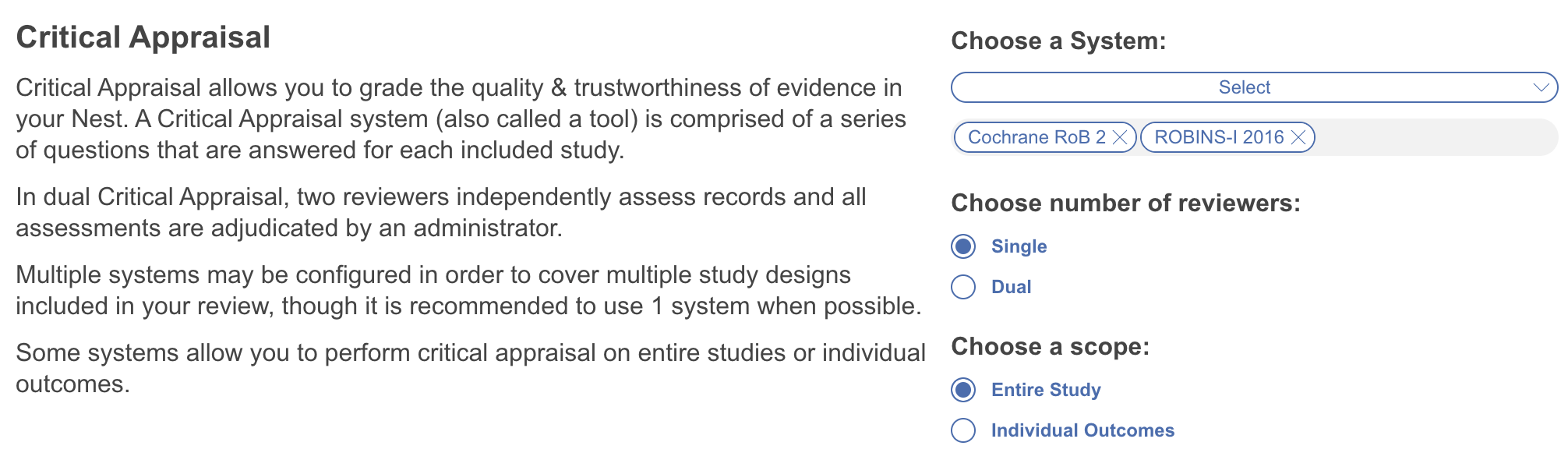
Open [Nest Settings](/your-nests/nest-settings.md) and select your appraisal system or systems. Each one you select shows as its own tab on the main Critical Appraisal page.
{% endstep %}

{% step %}

#### Configure Mode

Work in **Single mode**, or for greater reproducibility, **Dual mode** — two reviewers appraise independently and their judgments are reconciled, reducing the influence of any one reviewer's interpretation. Configure this here too.
{% endstep %}

{% step %}

#### Set The Scope Of Appraisal

Risk of bias can vary by outcome. Outcome-level tools such as RoB 2 and ROBINS-I are built around precisely this distinction.

That's why **Scope** lets you appraise either the entire study or specific outcomes:

* If you haven't [configured data elements for MA Extraction](/review-workflow/meta-analytical-extraction/configure-meta-analytical-extraction.md), leave the scope as **Entire Study**.
* If you have configured outcomes and want to appraise them individually, they appear here for selection.

<figure><img src="https://305208404-files.gitbook.io/~/files/v0/b/gitbook-x-prod.appspot.com/o/spaces%2Fxb7uNGATUgwQAjDVQRXG%2Fuploads%2FsOgrK5M9fvw8QsM9d4JC%2Fcritical%20appraisal%20settings.png?alt=media&amp;token=5824dd69-f27c-4930-834d-d010083ca03a" alt="The Scope setting offers Entire Study and individual outcome options for critical appraisal."><figcaption><p>Select whether to appraise the entire study or individual outcomes.</p></figcaption></figure>
{% endstep %}

{% step %}

#### Appraise Studies

Open Critical Appraisal and begin [appraising each study](/review-workflow/critical-appraisal/appraise-studies.md). Attach annotations linked directly to the text and to individual answers.

Alternatively run [Smart Critical Appraisal](/review-workflow/critical-appraisal/smart-critical-appraisal.md) for AI assistance.
{% endstep %}
{% endstepper %}

### FAQs

<details>

<summary>Can any reviewer adjudicate disagreements?</summary>

No — only users with admin privileges can adjudicate. Any user can act as a reviewer.

</details>

<details>

<summary>Can reviewers see each other's answers before adjudication?</summary>

No. A reviewer's answers, comments, and annotations are visible to adjudicators only, not to the other reviewer, until adjudication is complete.

</details>

<details>

<summary>What happens if I switch a nest from Dual back to Single mode?</summary>

Only adjudicated decisions carry over — no data is lost either way, so switching is safe to do freely.

</details>

<details>

<summary>Does Smart Critical Appraisal work with Dual mode?</summary>

Yes — it can generate recommendations at either the reviewer or final level. See [Smart Critical Appraisal](/review-workflow/critical-appraisal/smart-critical-appraisal.md) for how that generation run behaves.

</details>

<details>

<summary>Why can’t I see any outcomes when I set the scope to specific outcomes?</summary>

The **Individual Outcomes** scope works only when your nest uses Meta-Analytical Extraction. The outcomes list comes from the outcomes in your Meta-Analytical Extraction configuration. If your nest does not use Meta-Analytical Extraction, the list is empty.

We recommend that you use the **Entire Study** scope. Do not set up Meta-Analytical Extraction only to appraise specific outcomes. The extra work is usually not worth the benefit.

</details>

### Next Steps

<table data-card-size="large" data-view="cards"><thead><tr><th></th><th></th><th data-hidden data-card-target data-type="content-ref"></th></tr></thead><tbody><tr><td><i class="fa-sparkles">:sparkles:</i><br><strong>Smart Critical Appraisal</strong></td><td>Pre-fill appraisal judgments from full-text PDFs.</td><td><a href="/review-workflow/critical-appraisal/smart-critical-appraisal.md">Smart Critical Appraisal</a></td></tr><tr><td><i class="fa-clipboard-check">:clipboard-check:</i><br><strong>Appraise Studies</strong></td><td>Assess included studies against your configured appraisal system.</td><td><a href="/review-workflow/critical-appraisal/appraise-studies.md">Appraise Studies</a></td></tr><tr><td><i class="fa-chart-simple">:chart-simple:</i><br><strong>Critical Appraisal Visuals</strong></td><td>View stoplight diagrams and domain distribution outputs.</td><td><a href="/review-workflow/synthesis/navigate-synthesis-outputs/critical-appraisal-outputs.md">Critical Appraisal Outputs</a></td></tr></tbody></table>


---

# Agent Instructions
This documentation is published with GitBook. GitBook is the documentation platform designed so that both humans and AI agents can read, navigate, and reason over technical content effectively. Learn more at gitbook.com.

## Querying This Documentation
If you need additional information that is not directly available in this page, you can query the documentation by asking a question.

Perform an HTTP GET request on the following URL with the `ask` and `goal` query parameters:

```
GET https://docs.nested-knowledge.com/review-workflow/critical-appraisal/configure-critical-appraisal.md?ask=<question>&goal=<user_goal>
```

`ask` is the immediate question: it should be specific, self-contained, and written in natural language.
`goal` is what the user is ultimately trying to achieve, the reason they need the answer. Sharing it helps GitBook give you a better, more relevant answer. A goal is most helpful when it describes the outcome the user wants rather than restating the question. For example, with `ask=how do I create an API token`, a goal like `automate deployments from our CI pipeline` lets GitBook tailor the answer to that use case.

The response will contain a direct answer to the question and relevant excerpts and sources from the documentation.

Use this mechanism when the answer is not explicitly present in the current page, you need clarification or additional context, or you want to retrieve related documentation sections.
