> For the complete documentation index, see [llms.txt](https://docs.nested-knowledge.com/llms.txt). Markdown versions of documentation pages are available by appending `.md` to page URLs; this page is available as [Markdown](https://docs.nested-knowledge.com/review-workflow/literature-search/ai-tools-in-search/smart-search.md).

# Smart Search

Generate and review PubMed search queries from a research question.

**Smart Search** takes a single research question and uses AI to draft several ready-to-run PubMed search queries at different levels of breadth. It is a fast way to get from a research question to a workable search strategy without building Boolean syntax by hand.

If you're still shaping the scope of your review—testing which concepts belong, or seeing what the literature looks like before committing to a query—use [**Search Exploration**](/review-workflow/literature-search/ai-tools-in-search/search-exploration.md) instead.

### Create A Smart Search

{% stepper %}
{% step %}

#### Open Smart Search

On **Literature Search**, select **Smart Search**.

<figure><img src="https://305208404-files.gitbook.io/~/files/v0/b/gitbook-x-prod.appspot.com/o/spaces%2Fxb7uNGATUgwQAjDVQRXG%2Fuploads%2FQJN9lxMybZDQgRffIhsu%2Fliterature%20searches.png?alt=media&amp;token=4cbfed78-91b8-4548-b884-97f8b6f30da4" alt="The Smart Search option on the Literature Search page"><figcaption><p>Select <strong>Smart Search</strong> from <strong>Literature Search</strong>.</p></figcaption></figure>
{% endstep %}

{% step %}

#### Enter Your Research Question

Enter a brief statement of what you're researching. Select **Refine** to clarify specific concepts before generating queries.

<figure><img src="https://305208404-files.gitbook.io/~/files/v0/b/gitbook-x-prod.appspot.com/o/spaces%2Fxb7uNGATUgwQAjDVQRXG%2Fuploads%2FDMhRhJv2G24veReaj6HJ%2Fsmart%20search%20research%20q.png?alt=media&amp;token=8ba4feb6-20c4-4379-9066-8183728a2ea8" alt="The research question field in Smart Search"><figcaption><p>Enter your research question before generating queries.</p></figcaption></figure>
{% endstep %}

{% step %}

#### Refine The Question

To refine the question, select **Refine**. Answer only relevant questions and select `Enter` . Review the suggested wording, then select **Save**.

Smart Search asks follow-up questions and suggests revised wording.
{% endstep %}

{% step %}

#### Generate Queries

Select **Generate** to build the queries. This may take a minute. Close the window to continue working, then check progress in **Background Jobs** (the three line icon in top right).
{% endstep %}

{% step %}

#### Review Query Options

Review the three generated PubMed queries. If you navigated away, open Smart Search and select **View Recent** to reopen the results.

Select **Explore** to open [Search Exploration](/review-workflow/literature-search/ai-tools-in-search/search-exploration.md) with the query concepts entered. **Explore** doesn't change the query. If you already use Search Exploration in this nest, choose whether to replace its existing concepts.

Select **Finalize** to add a query. You can still edit it before running the search.

<figure><img src="https://305208404-files.gitbook.io/~/files/v0/b/gitbook-x-prod.appspot.com/o/spaces%2Fxb7uNGATUgwQAjDVQRXG%2Fuploads%2FCA8fOrc96KPTdjAhigRk%2Fsmart%20search%20queries.png?alt=media&amp;token=dd5c5ba9-6358-4a0a-832e-16c7b944f8d6" alt="Generated Smart Search query options with Explore and Finalize actions"><figcaption><p>Review generated queries, then select <strong>Explore</strong> or <strong>Finalize</strong>.</p></figcaption></figure>
{% endstep %}

{% step %}

#### Finalize And Add A Query

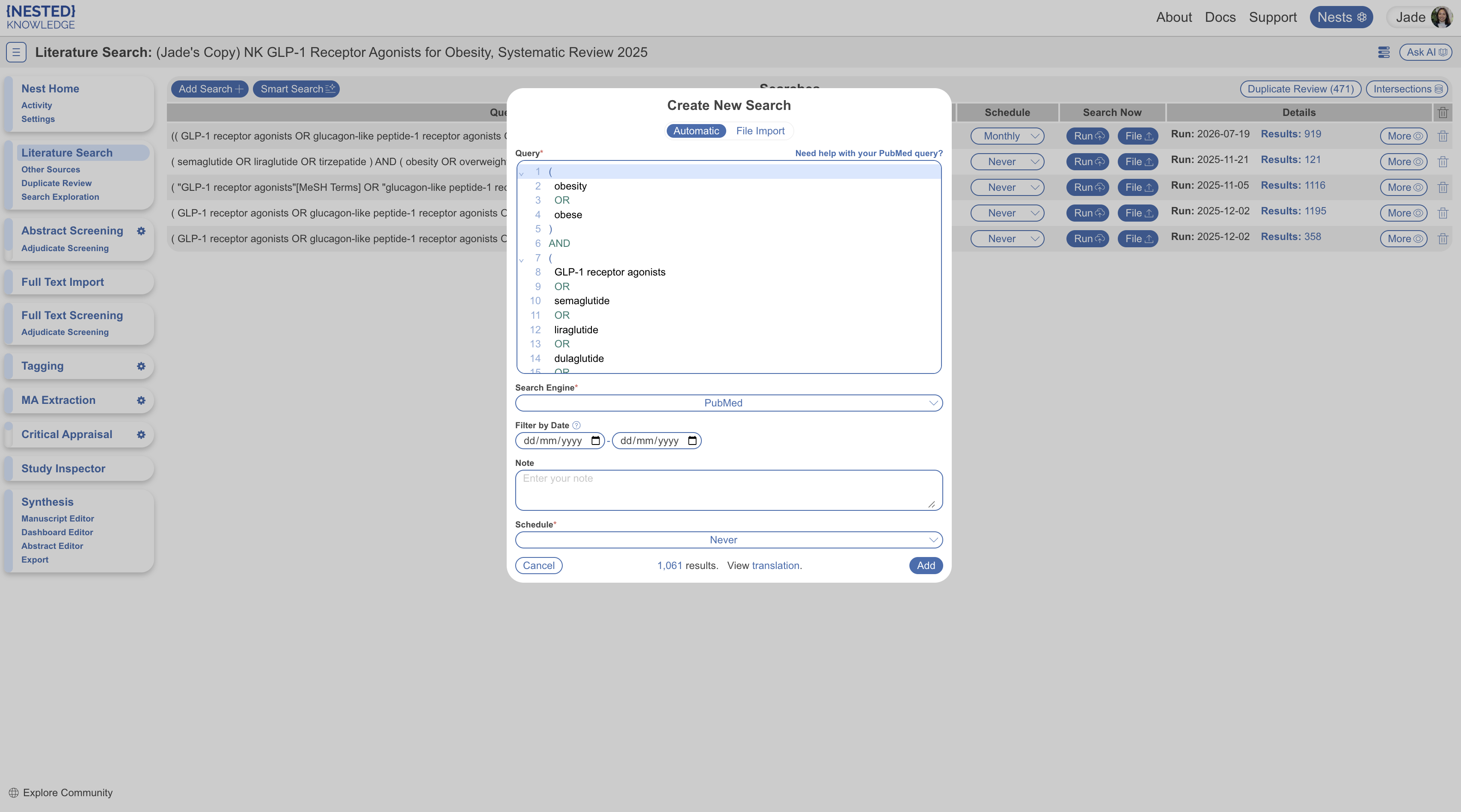
Select **Finalize** on the query you want to use. This opens **Add Search** with **Automatic Search** selected and the query entered.

Review or edit the query, search engine, date filter, and schedule. Smart Search queries are built for PubMed. Boolean syntax varies by engine, so review the query before running it elsewhere. Select **Add** to run the search.

<figure><img src="https://305208404-files.gitbook.io/~/files/v0/b/gitbook-x-prod.appspot.com/o/spaces%2Fxb7uNGATUgwQAjDVQRXG%2Fuploads%2FLbIV0B7IEy8pYBm3OtPY%2Fsmart%20search%20final.png?alt=media&amp;token=cb57e995-df5e-41ff-9ed4-f8c14ccec706" alt="The Add Search page with an Automatic Search query from Smart Search"><figcaption><p>Review the generated query in <strong>Add Search</strong> before running it.</p></figcaption></figure>

<details>

<summary>Query Translation</summary>

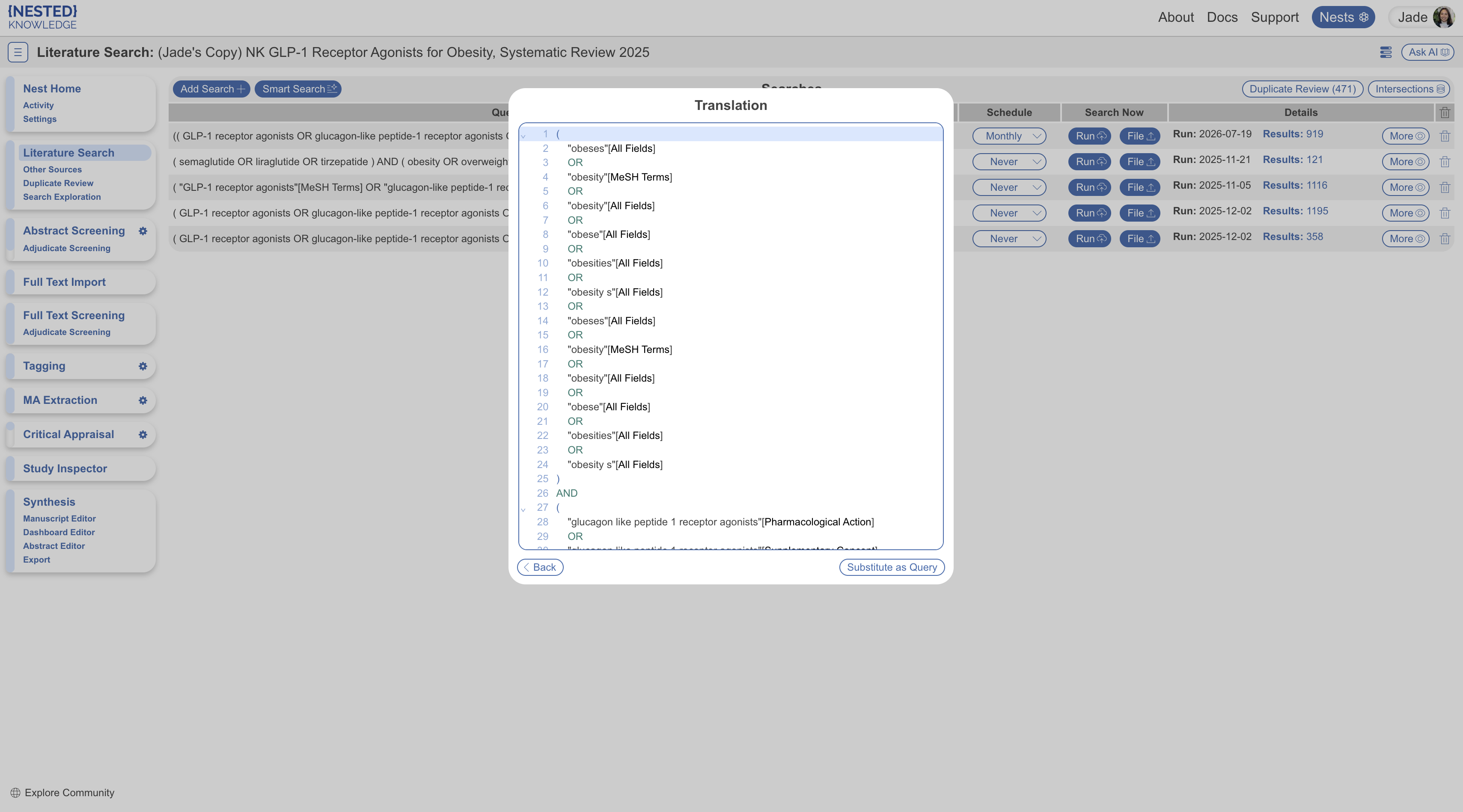
**Automatic Search** offers query translation for PubMed and Embase. For queries with simple operators, select **View translation** next to the search record number. The translation can add search syntax, including MeSH terms for PubMed. Review the translation, edit it if needed, and select **Add**.

<figure><img src="https://305208404-files.gitbook.io/~/files/v0/b/gitbook-x-prod.appspot.com/o/spaces%2Fxb7uNGATUgwQAjDVQRXG%2Fuploads%2FDp5rFaBl5gw3ax79uiZh%2FQuery%20translation.png?alt=media&amp;token=49f15741-02be-4510-a60f-95b17f602863" alt="The View translation control beside a search record"><figcaption><p>Select <strong>View translation</strong> to review the translated query.</p></figcaption></figure>

<figure><img src="https://305208404-files.gitbook.io/~/files/v0/b/gitbook-x-prod.appspot.com/o/spaces%2Fxb7uNGATUgwQAjDVQRXG%2Fuploads%2FSgnDqGoKWf3yTpxsU0rM%2Fquery%20translation2.png?alt=media&amp;token=21fd1df2-9bd4-45be-9ed4-cf10b61585ff" alt="A translated search query ready for review"><figcaption><p>Review and edit the translated query before adding it.</p></figcaption></figure>

</details>
{% endstep %}
{% endstepper %}

{% hint style="info" %}
If you're not ready to finalize, close the window. Your generated queries are saved for the next time you open **Smart Search**.
{% endhint %}

### FAQs

<details>

<summary>Can I run a Smart Search query on a database other than PubMed?</summary>

Select a different search engine when you finalize the search, but **Smart Search** queries are built for **PubMed**. Review the query before using another engine. See [**Automatic Search**](/review-workflow/literature-search/add-search/automatic-search.md) for engine-specific guidance.

</details>

<details>

<summary>Can I edit the AI-generated query before I add the search?</summary>

Yes. After you select **Finalize**, the query box on the **Add Search** page is pre-filled with your chosen query and it's editable. Edit it as you would any **Automatic Search** query before selecting **Add**.

</details>

<details>

<summary>Does generating queries change anything in my nest before I finalize?</summary>

No. Entering a research question, refining it, and generating candidate queries doesn't add or change any records in your nest. Records are only added once you select **Add** on the **Add Search** page.

</details>

<details>

<summary>What happens to my queries if I close the window without finalizing?</summary>

They're saved. Reopen **Smart Search** from **Literature Search** to continue, including any saved question refinements.

</details>

<details>

<summary>How is Smart Search different from Search Exploration?</summary>

**Smart Search** turns one research question into several **PubMed** queries. In **Search Exploration**, you build a query concept by concept while previewing the literature. Use **Smart Search** when the review scope is defined. Use **Search Exploration** when you're still defining it.

</details>

### Next Steps

<table data-card-size="large" data-view="cards"><thead><tr><th></th><th></th><th data-hidden data-card-target data-type="content-ref"></th></tr></thead><tbody><tr><td><i class="fa-rotate">:rotate:</i><br><strong>Automatic Search</strong></td><td>Run and schedule searches in supported databases.</td><td><a href="/review-workflow/literature-search/add-search/automatic-search.md">Automatic Search</a></td></tr><tr><td><i class="fa-compass">:compass:</i><br><strong>Search Exploration</strong></td><td>Build and preview a query concept by concept.</td><td><a href="/review-workflow/literature-search/ai-tools-in-search/search-exploration.md">Search Exploration</a></td></tr><tr><td><i class="fa-file-import">:file-import:</i><br><strong>Import Search Files</strong></td><td>Add results from searches you ran outside Nested Knowledge.</td><td><a href="/review-workflow/literature-search/add-search/import-search-files.md">Import Search Files</a></td></tr><tr><td><i class="fa-file-circle-plus">:file-circle-plus:</i><br><strong>Other Sources</strong></td><td>Add records from gray literature and other sources.</td><td><a href="/review-workflow/literature-search/other-sources.md">Other Sources</a></td></tr><tr><td><i class="fa-clone">:clone:</i><br><strong>Duplicate Review</strong></td><td>Review records that may match records already in your nest.</td><td><a href="/review-workflow/literature-search/duplicate-review.md">Duplicate Review</a></td></tr><tr><td><i class="fa-list-check">:list-check:</i><br><strong>Screening</strong></td><td>Screen the records you imported and searched.</td><td><a href="/review-workflow/screening.md">Screening</a></td></tr></tbody></table>


---

# Agent Instructions
This documentation is published with GitBook. GitBook is the documentation platform designed so that both humans and AI agents can read, navigate, and reason over technical content effectively. Learn more at gitbook.com.

## Querying This Documentation
If you need additional information that is not directly available in this page, you can query the documentation by asking a question.

Perform an HTTP GET request on the following URL with the `ask` and `goal` query parameters:

```
GET https://docs.nested-knowledge.com/review-workflow/literature-search/ai-tools-in-search/smart-search.md?ask=<question>&goal=<user_goal>
```

`ask` is the immediate question: it should be specific, self-contained, and written in natural language.
`goal` is what the user is ultimately trying to achieve, the reason they need the answer. Sharing it helps GitBook give you a better, more relevant answer. A goal is most helpful when it describes the outcome the user wants rather than restating the question. For example, with `ask=how do I create an API token`, a goal like `automate deployments from our CI pipeline` lets GitBook tailor the answer to that use case.

The response will contain a direct answer to the question and relevant excerpts and sources from the documentation.

Use this mechanism when the answer is not explicitly present in the current page, you need clarification or additional context, or you want to retrieve related documentation sections.